
RGB vs RGBW vs RGBIC: Which Strip for the Job
RGB vs RGBW vs RGBIC from a job-site view: color accent, real white light, or addressable pixel effects — with the voltage, signal and IP specs installers need.
RGB vs RGBW vs RGBIC: what each name means on a job sheet
When the decision on the table is RGB vs RGBW vs RGBIC for a real install, the outcome is simpler than the alphabet soup suggests: RGB strips mix red, green and blue to make color and a muddy version of white; RGBW strips add a dedicated white diode for real white light; RGBIC and "pixel" strips put an IC on each LED or segment so different colors can run on one strip at the same time. Every other difference on a job site — wire count, controller, power plan, cut points, IP rating — follows from that one architectural fact.
The retail naming makes this harder than it needs to be, and the "RGBIC meaning" question comes up on almost every sign job we quote. RGBIC is a consumer marketing term, popularized by smart-home brands, for what the lighting industry calls individually addressable or pixel strip. If you spec signs, coves or facades for a living, you are buying pixel strip whether the label says RGBIC, addressable, or WS2811. So the real question on a job site is not "RGBIC or not" — it is which of three families belongs in this install.
Strip type | Best for | White light | Control | Wires |
|---|---|---|---|---|
RGB | Color accent, effects at low cost | Mixed (blue-ish, low CRI) | One color across the whole strip | 4 (V+, R, G, B) |
RGBW | Color + real white in one run | Dedicated white diode (true white) | One color across the whole strip | 5 (V+, R, G, B, W) |
RGBIC / pixel | Signs, facades, animated effects | Mixed, unless a white-channel variant | Per-LED or per-segment (data signal) | 3 (V+, GND, DATA) |
A LED strip light is a flexible PCB with SMD LEDs and resistors in series; everything above is a variation on that PCB. What differs is how many diodes are in each chip, and whether a driver IC sits on the strip.
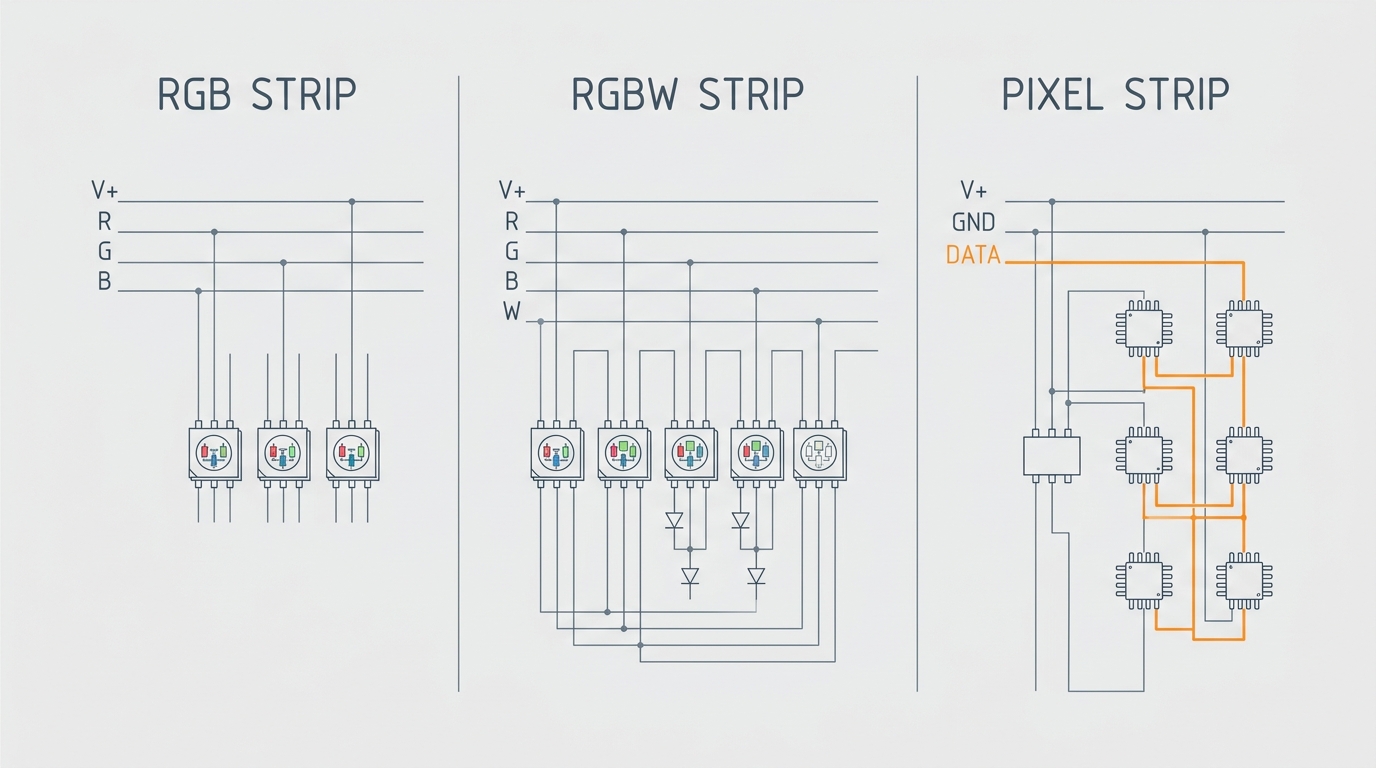
Wiring is the first job-site difference: RGB runs 4 wires, RGBW runs 5, and pixel strip needs only power, ground and data.
RGB strip: color accent only
An RGB strip uses a 3-in-1 chip with red, green and blue diodes. Drive all three at full power and you get white — sort of. Mixing 100% R + G + B produces an off-white that reads blue or purple on camera, with poor color rendering, which is why RGB white is a running joke in installs where white matters. RGB is for color, not for white.
What RGB does well on a job site:
- Cheap per meter. Three-channel chips and simple PWM controllers keep the line cost low, which matters when a client wants a long accent run and nothing else.
- Simple to drive. A standard RGB controller dims the three channels; no data wiring, no addressing, no protocol.
- Predictable to cut. Most 12 V RGB strip cuts every three LEDs at marked lines, so field trimming is fast.
What it cannot do: run two colors on the same strip at once, or produce a white you would put near merchandise, paint samples or food. The whole strip is one color at a time — that is the physical limit of a 3-in-1 chip with no independent control.
One more field consideration: RGB strip quality varies more than the other two families, because the "spec" is just three diodes and a resistor. Cheap reels use loosely binned LEDs, so two batches on the same job can drift apart in color — a real problem on a 30 m cove where the client walks the length with a color chart. If you are forced to RGB on a long run, buy one continuous reel or matched batches from a supplier who bins the LEDs, and budget a spare reel from the same lot for callbacks.
If the spec says "color-changing accent, no white requirement," RGB is a legitimate, budget-honest answer. If anyone on the project mentions task light, display cases, or "white that looks white," RGB is the wrong family — read the next section.
RGBW strip: when the spec calls for real white
An RGBW strip uses a 4-in-1 chip: the same R, G, B diodes plus a dedicated white diode. That fourth channel is the whole point — it gives you true white (fixed by the chip's color temperature, typically warm, natural or cool) without burning three color channels to fake it. It also lets you mix pastels and saturated colors more cleanly, because white is no longer subtracting from the RGB budget.
An RGBW LED strip is the working default for commercial white-plus-color runs, and the rgb vs rgbw choice on a quote is usually a white-light question in disguise: if the client can point to a surface that must look white, the answer is RGBW.
RGBW earns its place on a job sheet when any of these is true:
- Coves and indirect lighting where white is on for hours and color is an occasional mode.
- Retail and display lighting where color accuracy and neutral white matter (clothing, paint, cosmetics, food).
- Anywhere a photo or camera will judge the white — a mixed-white RGB strip looks wrong on a phone screen before it looks wrong to your eye.
- Signage interiors where the sign must read clean white by day and color at night.
The trade-offs are real: RGBW costs more per meter than RGB, and like RGB it is one-color-at-a-time across the full run. If you need white and animation in the same strip, plain RGBW is not enough — but an addressable RGBW chip like the SK6812 puts a white diode and a control IC in every LED, which is how you get pixel effects with clean white. Adafruit's SK6812 documentation walks through exactly that chip and its white-channel behavior.
White channel selection deserves its own line in the quote. The white diode on an RGBW strip is a fixed color temperature — warm (2700–3000 K), natural (4000 K) or cool (6000 K+) — so the choice is a design decision, not a detail. For retail and food display, spec a high-CRI white channel (90+ CRI) and say so in the BOM; a generic RGBW reel with a mediocre white diode defeats the purpose of paying for RGBW at all. For coves, ask whether the white will be dimmed a lot: some RGBW chips shift hue at low dim levels, which is why premium reels bin the white diodes just like they bin the color ones.
One spec trap: RGBW strips with 5 wires (V+, R, G, B, W) do not work with a standard 4-wire RGB controller — the white channel needs its own output. Check the controller before you quote, not after the strip arrives on site.
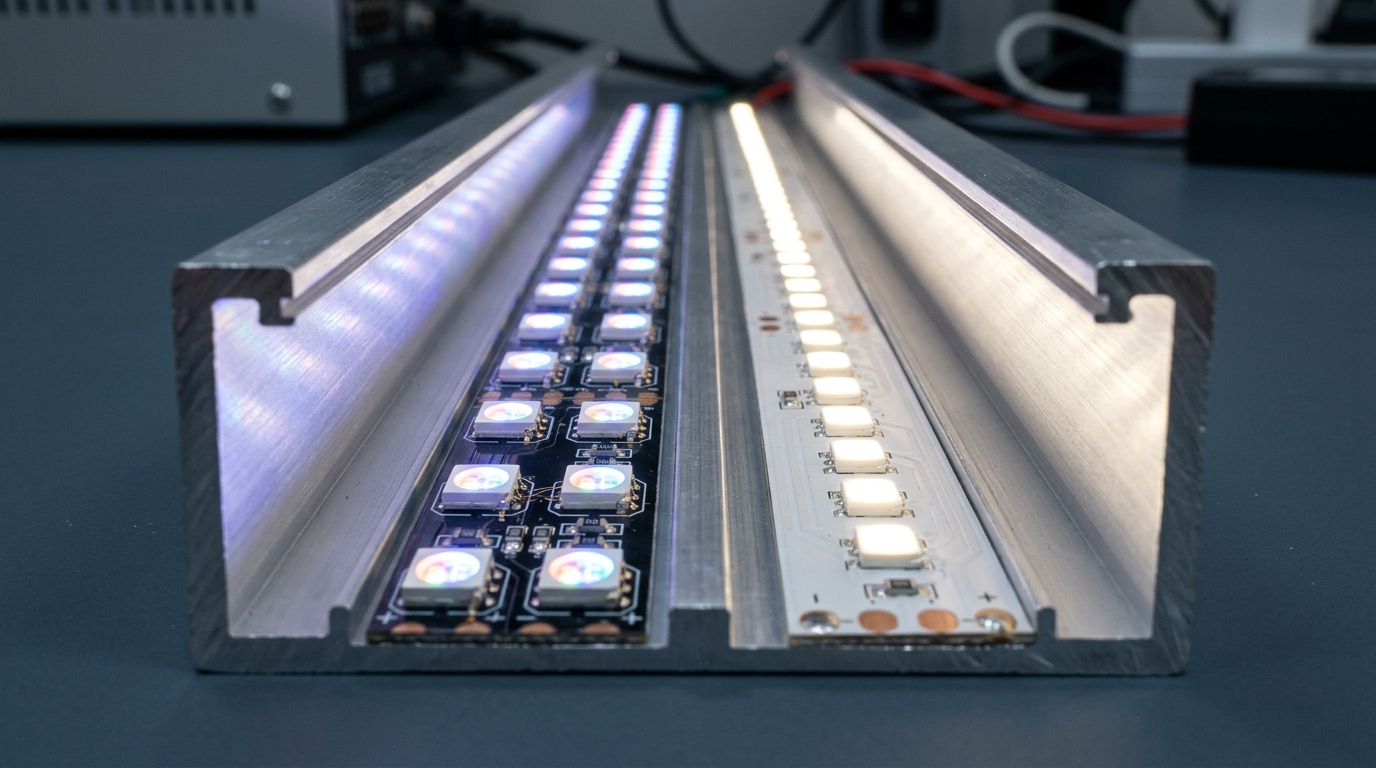
The difference buyers actually see: mixed RGB white on the left versus a dedicated white diode on the right.
RGBIC and pixel strip: addressable control for effects
Here is where the terminology actually matters. RGBIC means Red, Green, Blue + Independent Control — the consumer-facing name for strip that carries a driver IC per LED or per small group. In professional language that same hardware is an individually addressable or pixel strip, and it is usually named after its driver IC: WS2811, WS2812B, WS2815, SK6812, TM1814, UCS1903.
The architecture: instead of one resistor per LED, the strip carries ICs that each listen for a slice of a serial data signal and latch their own color. Power in, ground, and one data line — three wires total — and every pixel on the run can hold a different color at the same instant. That is how you get chases, gradients, scrolling text on a sign face, and pixel-mapped video on a facade.
The chips matter because they change what you can promise a client:
- WS2812B is the per-LED workhorse: a 5 V chip with the IC built into every 5050 LED, controllable down to a single LED (its datasheet defines the 800 kHz data protocol). High pixel density, tight control, but 5 V means power injection on longer runs.
- WS2811 is the external 3-channel driver: one IC per group of three LEDs, usually on 12 V strip, so fewer injection points and easier long runs at the cost of coarser pixels (see the WS2811 datasheet).
- WS2815 is the 12 V per-LED chip with breakpoint continuation — if one LED dies, data keeps flowing past it instead of killing the rest of the run. On a facade or a sign you cannot climb to, that feature is worth real money.
- SK6812 is the 5 V per-LED chip with a white channel — the addressable RGBW option for jobs that need pixel effects and clean white from the same strip.
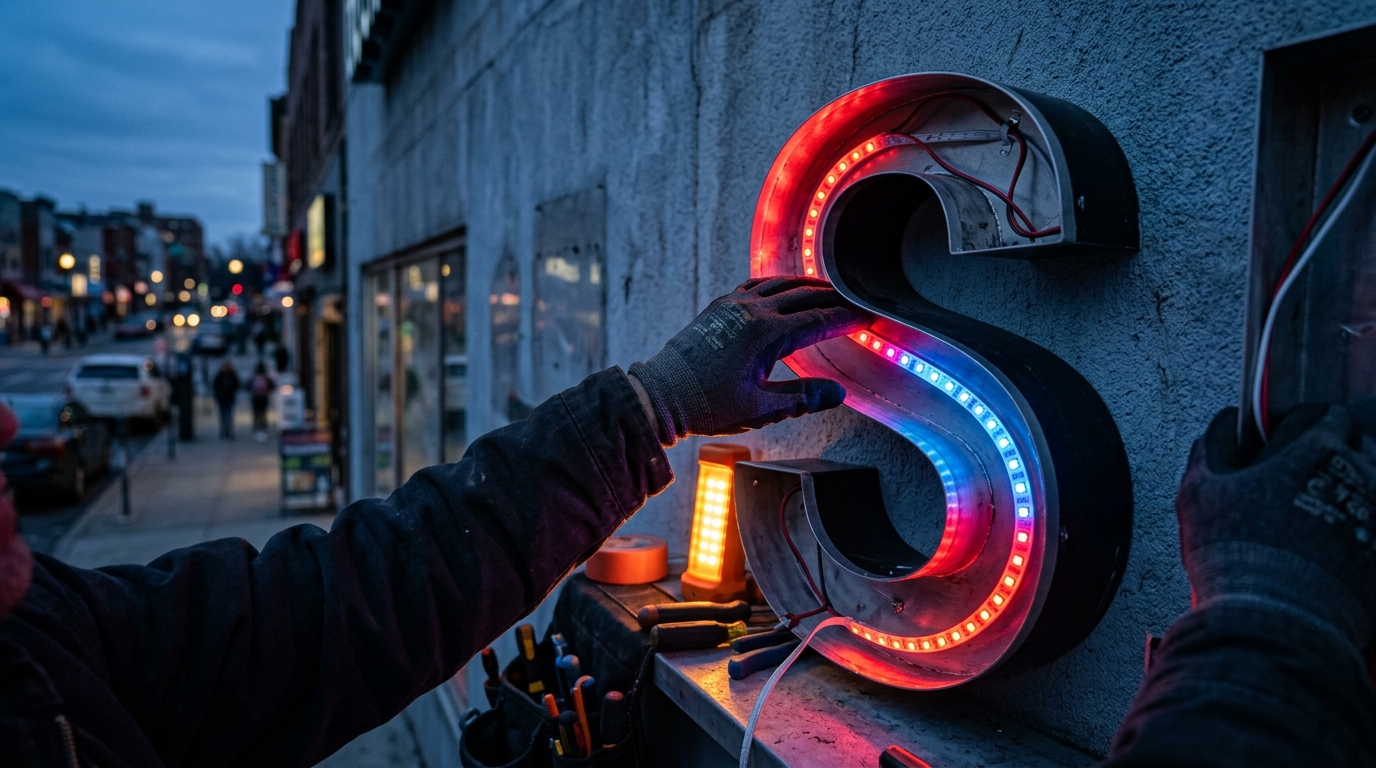
If your job is channel letters, cabinet signs, facade accents, or any animated perimeter lighting, pixel strip is the family — and the IC choice is a spec decision, not a brand decision. Adafruit's NeoPixel guide is the best plain-language explanation of how addressable data and power interact, and is worth handing to a client who keeps asking why "the cheap RGB strip" is not the same thing.
Two field truths about RGBIC/pixel strip:
- White is still mixed. A standard RGBIC/pixel strip fakes white the same way RGB does. The "Can RGBIC do white?" question has a real answer: only if you buy a white-channel variant (RGBICW / SK6812-style). Otherwise budget for a separate white strip or RGBW run.
- Cutting is IC-dependent. Pixel strip cuts per LED (WS2812B, SK6812) or per three LEDs (WS2811), and the cut must land at the marked point or the segment after it dies. A consumer RGBIC LED strip from a smart-home brand is often not cuttable at all — one more reason to spec by IC, not by brand name. In the rgbic vs rgb face-off, cutability is where the professional and consumer worlds diverge hardest.
Pixel density is the other number to pin down in the spec: 30, 60 or 144 LEDs per meter changes both the look and the job. At 30/m you get a readable chase but blocky gradients up close; at 144/m a 2 cm section of sign face becomes a smooth mini-screen, at the cost of roughly double the power draw and injection points. For channel letters and small-format signs, 60/m is the working default; dense media facades are where per-LED density earns its premium. When you search for an addressable RGB LED strip, the first thing to check in the listing is not the color — it is the LEDs-per-meter and the IC name, because those two numbers decide everything the controller and power supply have to do. And when someone asks for a pixel LED strip without naming an IC, ask the density question back: it tells you whether they want a 3 m accent or a 30 m media surface, which are different products with different failure modes.
Channel letters are where pixel strip earns its keep: every LED addressable, so the whole face can animate.
RGBW vs RGBIC: head to head
The most-asked version of this comparison is RGBW vs RGBIC, and the honest answer is: they are not competitors, they answer different questions.
Question the job asks | Winner |
|---|---|
Does the space need real white light? | RGBW (or SK6812 if effects are also needed) |
Does the design need animation, gradients or pixel mapping? | RGBIC / pixel |
Both, on a tight budget? | Two runs: RGBW for white duty, pixel for the feature zone |
Neither — just color accent? | RGB |
RGBW wins on light quality: true white, better pastels, cleaner color mixing. RGBIC wins on spectacle: multiple colors at once, chases, media content. The only place they genuinely overlap is the addressable-RGBW middle ground (SK6812, RGBICW), which costs more per meter and buys you both — decide whether the white channel is worth the premium, because it often is in commercial coves.
If a client asks "which is better," the professional answer is a counter-question: what is the strip for? If the answer is "white light with color options," RGBW. If it is "color show," pixel. That is the whole framework.
What changes on the job site: voltage, signal, IP, cutting
The differences that wreck installs are not the diode counts — they are what the strip demands from the rest of your system. This is the table to keep in the van:
Dimension | RGB | RGBW | RGBIC / pixel |
|---|---|---|---|
Wire count | 4 (V+, R, G, B) | 5 (V+, R, G, B, W) | 3 (V+, GND, DATA) |
Control signal | PWM dimming | PWM dimming | Serial data (SPI/TTL, or DMX via decoder) |
Power planning | Simple | Simple | Injection points every few meters on 5 V |
Cut points | Per 3 LEDs (12 V) | Per 3 LEDs (12 V) | Per LED or per 3, IC-dependent |
White light | Mixed, poor CRI | Dedicated, true | Mixed unless white-channel variant |
Multiple colors at once | No | No | Yes, per pixel |
Typical IP need | IP20 indoor | IP20–IP65 | IP20–IP68, seal per environment |
Three job-site realities behind that table:
Power. Addressable strip at 5 V pulls real current and drops voltage fast — plan injection points every few meters on dense runs, or step up to 12 V (WS2811/WS2815) and 24 V / 48 V designs that run much further. Under-powering a pixel run is the classic cause of "the far end is a different color" callbacks. As a working rule for 5 V high-density strip, inject every 2–3 m; at 12 V you can usually push 5 m between feeds, and 24–48 V systems are built for tens of meters between supplies. Put the feed points in the drawing before the cable run is pulled, not after the far end goes amber.
Signal. Pixel strip needs a data source: a controller with SPI output, or a DMX512-to-SPI decoder fed from a lighting console or Art-Net node. DMX512 is the professional control backbone for stage and architectural lighting, and it is a 512-channel-per-universe protocol — worth knowing exactly how many pixels one universe carries before you spec a 10,000-pixel facade (see the DMX512 overview). A standard PWM RGB controller cannot drive an addressable strip, full stop. Data also wants to be treated like signal, not like power: keep data runs away from mains and motor cables, and use a proper level-shifter or decoder when the controller runs at a different voltage than the strip.
Environment. IP rating decides whether the strip survives the location: IP20 for dry interior coves, IP65 with silicone coating for damp or dusty runs, IP67/IP68 for outdoor or washdown exposure. Sealing changes cutting and soldering on site — an IP68 pixel strip is not something you field-splice casually. Match the rating to the zone before you order, not after water finds it. If the job is a sign that faces weather, the IP conversation happens in the quote phase, because it drives the connector and sealant line items as much as the strip itself.
How to choose for your next job
Three questions, in order, give you the answer for almost any job:
- Does any zone need real white light? Yes → RGBW (or addressable RGBW if effects are also required). No → continue.
- Does any zone need multiple colors at once — animation, gradients, media content? Yes → RGBIC / pixel strip, IC chosen by voltage and breakpoint needs. No → continue.
- What is the environment? Dry interior accent → plain RGB is fine. Damp, outdoor, or washdown → RGBW or pixel with the IP rating matched to the zone.
By job type, that resolves to:
- Channel letters and cabinet signs → pixel strip (WS2811-class for long 12 V runs, WS2815 where breakpoint continuation matters). Signage is covered in depth in the sign and storefront pixel lighting guide.
- Coves with white-hours and color-hours → RGBW, or SK6812 pixel-RGBW if the client wants effects in the same run.
- Facade accents and curtain walls → pixel strip or pixel bars, 12–48 V, IP65–IP67, with DMX/Art-Net control planned from the start.
- Indoor retail displays → RGBW for color truth; pixel for animated window features.
- Pure color accent, no white, dry location → RGB, and spend the savings on a better controller.
Sourcing: putting the right strip in the BOM
Once the strip family is locked, the BOM line should carry five fields, not one: driver IC, voltage, IP rating, control protocol, and color type. Two strips that both say "RGBW" can still differ in voltage, CCT, pixel density and whether they are addressable — and the difference is exactly what causes field failures.
That is also the reason to buy from a manufacturer rather than a re-seller when the project is commercial: you need the IC, voltage, IP and protocol configured to your spec, cut to length, and backed by a supplier who also makes the controllers that drive them. PILEDS is a factory-direct pixel LED manufacturer that builds all three families — RGB, RGBW and addressable LED strip, plus the Art-Net, DMX512 and SPI controllers that run them — and configures each order by IC, voltage, IP and protocol with low MOQs for qualified projects. If you are spec'ing a job this week, the fastest way to de-risk it is to send the five-field BOM line and the zone list to a manufacturer's engineer before you commit.
For the rest of the decision tree — from IP ratings to driver ICs — the pixel LED strip buyer's guide is the hub for this whole comparison, with the LED strip IP rating guide, the WS2811 vs WS2812B driver IC comparison, and the addressable driver IC guide covering the two dimensions that cause the most callbacks: sealing and chips.
Specifying pixel LED for a real project?
Send the spec — pitch, IC, IP class, run length, voltage — and you get an engineer's answer, not a catalogue. Samples and OEM/ODM quotes from the Shenzhen factory floor.