
DMX-SPI Decoder: Match It to Your Pixel Strip
Choose a DMX-SPI decoder by channel budget, strip IC, frame rate and power, not by the pixel rating on the box. Five checks, one triage order, one RFQ list.
A DMX-SPI decoder is the box that lets a 512-channel lighting console address individual pixels. Choose one by matching four numbers — the channels your pixel count consumes, the serial rate your strip's IC accepts, the data wires the strip actually has, and the current its terminals must pass — then by the enclosure it lives in. Those five checks eliminate most wrong parts before you look at a price; the bad purchases here are correct decoders bought against the wrong line on the spec sheet.
The protocols are easy to confuse because both get called "control". DMX512 is a channel protocol: 512 slots per universe, each a level from 0 to 255, refreshed over a two-pair cable. SPI is not a protocol in that sense at all — it is a bit stream a driver chip shifts into its own register, 24 bits per pixel for an RGB part, with no addresses and no slots. A decoder sits between the two and translates, pixel by pixel, at whatever rate the strip's silicon allows.
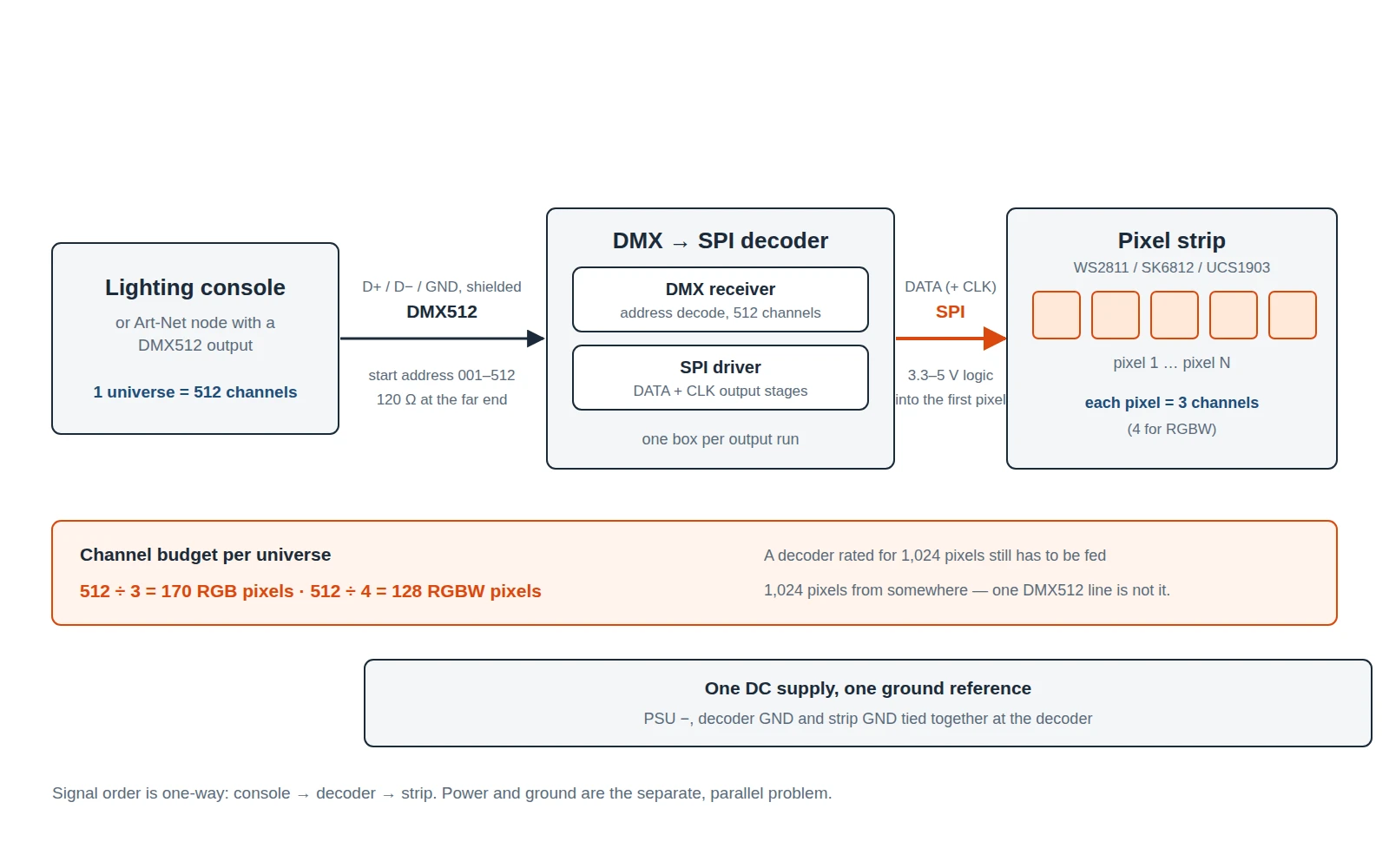
A decoder does not create control capacity: it turns one 512-channel universe into a serial stream, and what that stream carries is fixed by arithmetic.
What a DMX-SPI decoder does that a DMX decoder does not
A plain DMX decoder, sold for analog RGB strip, maps three consecutive channels to three output transistors and dims a colour: three channels, one fixture. A DMX-SPI decoder maps those same three channels to one pixel, then the next three to the next pixel, and pushes the result out as a serial stream that the strip's ICs pass along the run. One box, hundreds of individually addressable points.
Three consequences follow. Wiring: the strip needs DATA, positive and negative — plus a clock pair if the IC is clocked — not three dimmed outputs. Diagnosis: an analog run fails whole or in segments, while a pixel run can fail at one point and continue, because most pixel ICs reshape and re-transmit what they receive. Operation: most of these boxes also generate patterns with no console present.
Where that line sits matters. If the strip is analog RGB — four conductors, no IC — a PWM constant-voltage decoder is the right part and a DMX-SPI box will send it a signal it cannot read. If the strip carries a driver chip, a three-channel DMX decoder lights the whole run as one colour whatever the console does. The chip family decides; the wider map is in our addressable LED driver IC and protocol guide.
Question 1: what is upstream of the decoder?
Start at the console end: the input side is the one thing you cannot change later.
A DMX512 line carries one universe to up to 32 unit loads, terminated with a 120 Ω resistor at the far end; the input arrives on 3-pin or 5-pin XLR, and on RJ45 where the rig follows network cabling conventions. The standard itself — ANSI E1.11 — is published through ESTA's Technical Standards Program. If one universe reaches every decoder in the rig, a decoder with a DMX input and nothing else is enough, and the simplest thing to repair on site.
The picture changes when the content is pixel-mapped. A media server running mapping software produces many universes at once, and Art-Net or sACN puts them on Ethernet instead of copper pairs. A DMX512 decoder with only a DMX input cannot join that network by itself: it needs a node upstream converting network traffic back to DMX, or a controller that speaks Art-Net and exposes SPI ports directly. The four questions that settle that choice are in our DMX512 vs Art-Net comparison.
Question 2: how many channels will your pixels eat?
The arithmetic nobody prints on a product page is also the most expensive thing to get wrong.
One universe holds 512 channels. An RGB pixel consumes three; an RGBW pixel consumes four. Divide before you shop.
What you are driving | Channels needed | Universe space |
|---|---|---|
50 RGB pixels (a small chase) | 150 | under one third of a universe |
170 RGB pixels | 510 | 510 of 512 channels |
128 RGBW pixels | 512 | exactly one universe |
512 RGB pixels | 1,536 | three universes |
1,024 RGB pixels | 3,072 | six universes |
Read that against a decoder datasheet. One DMX-SPI decoder datasheet (SKU DMX-SPI, sold by Flexfire LEDs) specifies "up to 900 pixels in standalone controller mode or up to 170 pixels in DMX decoder mode" — the same box, two numbers a factor of five apart (data sheet, PDF). That second figure is the 512-channel ceiling on the input side, not a hardware limit. Any decoder described as "1,024 pixels" is quoting what its SPI output can shift, not what one DMX512 line can feed it.
Two numbers get confused in every decoder purchase: what the box can shift, and what the line can feed it. Only the second one is your budget.
So the question is not "how many pixels does the decoder support" but "where do the channels come from". Three answers exist: the controller sends several consecutive universes to that box (many do, over the same link); the decoder runs from a stand-alone source such as an SD card; or the run is capped at 170 pixels per universe and you add outputs. If a supplier cannot say which applies, you have found the wrong supplier rather than the wrong decoder. The underlying concept is covered in what a DMX universe actually is.
The DMX512 start address follows from the same arithmetic. It is the first of the 512 slots the decoder claims, so a 170-pixel run patched at 001 occupies 001–510 and leaves 511–512 idle. A second decoder on that same line cannot be fitted at all — not because its address is set wrong, but because no channel is left for it. It needs a second universe or another output.
Question 3: can the strip keep up with the frame rate?
Pixel count is also a frame-rate decision, which stage and broadcast buyers feel first.
WS2811-family silicon runs at 800 kbit/s and takes 24 bits per pixel, so frame time scales linearly: pixels × 24 ÷ 800,000 seconds. The WS2812B datasheet states the practical form of the same limit — at a 30 fps refresh, cascade length is "not less than 1024 pixels". Above that, the strip cannot refresh faster regardless of the console.
Pixels in the run | Frame time at 800 kbit/s | Ceiling |
|---|---|---|
170 (one universe of RGB) | 5.1 ms | about 196 fps |
512 | 15.4 ms | about 65 fps |
1,024 | 30.7 ms | about 33 fps |
2,048 | 61.4 ms | about 16 fps |
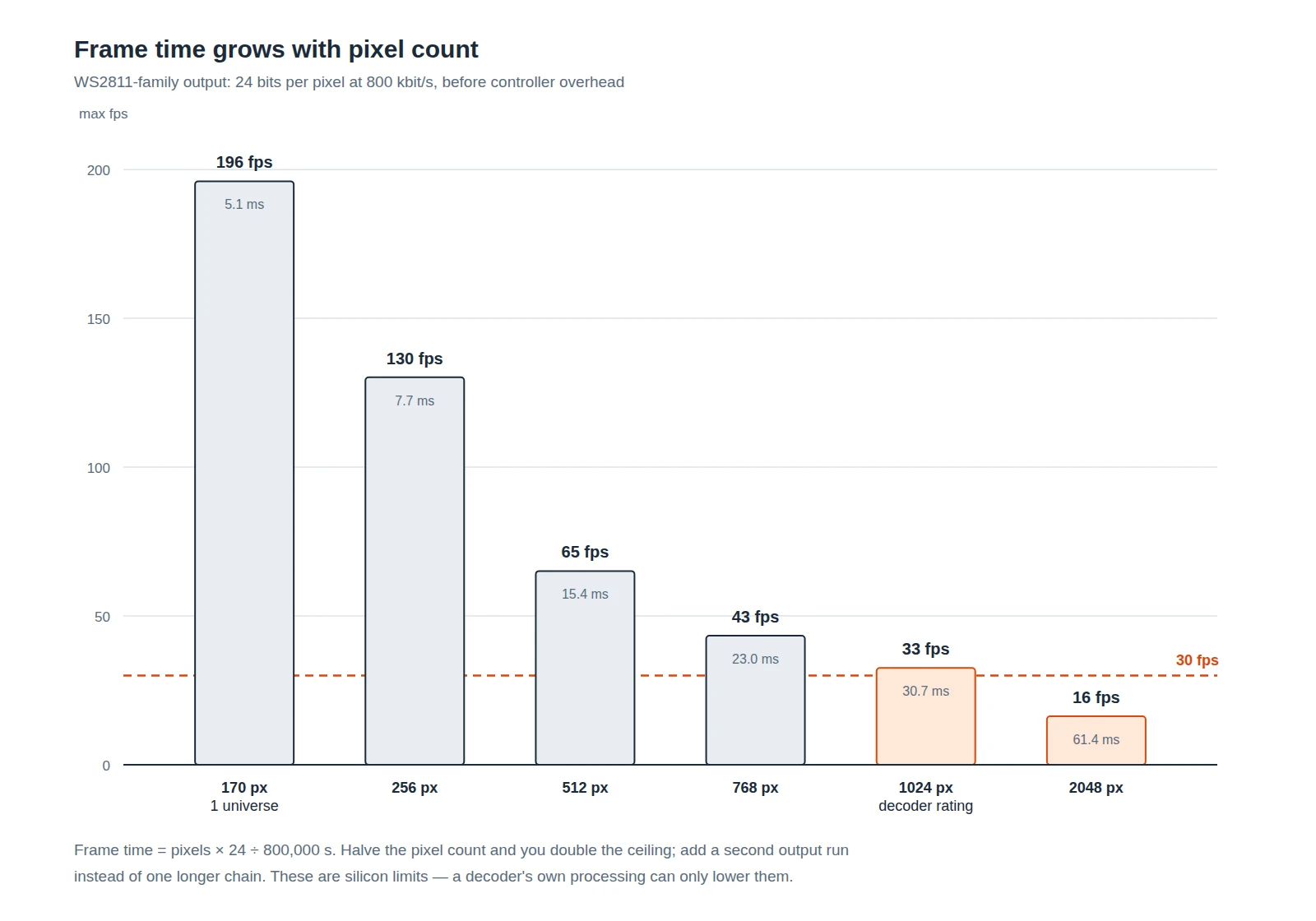
Silicon limits, not promises: decoder processing, the reset gap and any colour correction only lower them. Plan for two thirds of the ceiling.
Two readings follow. If the installation is on camera — broadcast, a filmed performance, a facade that gets photographed — keep each output run at or below 512 pixels so the ceiling stays well above 30 fps. If the strip is clocked, the constraint relaxes sharply: those ICs shift at megahertz rates.
Question 4: does the output match your strip's IC?
Every decoder page says it supports "WS2811, WS2812B, SK6812, APA102 and more". That sentence is close to meaningless, because what has to match is not a brand list but three electrical facts.
Strip family | Data wires | What the decoder has to get right |
|---|---|---|
WS2811 / WS2812B / WS2815 | 3 (DATA, +, −) | 24 bits per pixel in GRB order — the datasheet specifies green first — a reset gap of 50–280 µs depending on the part, and a 5 V data level on most parts |
SK6812 (RGB and RGBW) | 3 | 24 bits for RGB, 32 for RGBW; the white byte exists only on four-colour parts |
UCS1903 / TM1804 / TM1809 | 3 | 24 bits, frequently RGB order where WS2811 expects GRB |
WS2801 / LPD6803 / P9813 | 4 (DATA + CLK) | the decoder must output a clock line, not just data |
APA102 / SK9822 | 4 (DATA + CLK) | clocked at high bit rates, 32 bits per pixel: a brightness byte plus B, G, R |
Two of these bite hardest. Byte order is a firmware setting on the decoder and a fixed fact on the strip, so a box set to RGB driving GRB pixels paints a green face where red was asked for — the classic first-night failure. And a three-wire strip on a decoder configured for clocked output will not light at all, because DATA is asserting a level the IC never reads as a start bit. Data also flows one way, into the strip's input end marked by arrows or "DIN"; reversing it is the second most common first-night failure and looks like a dead strip.
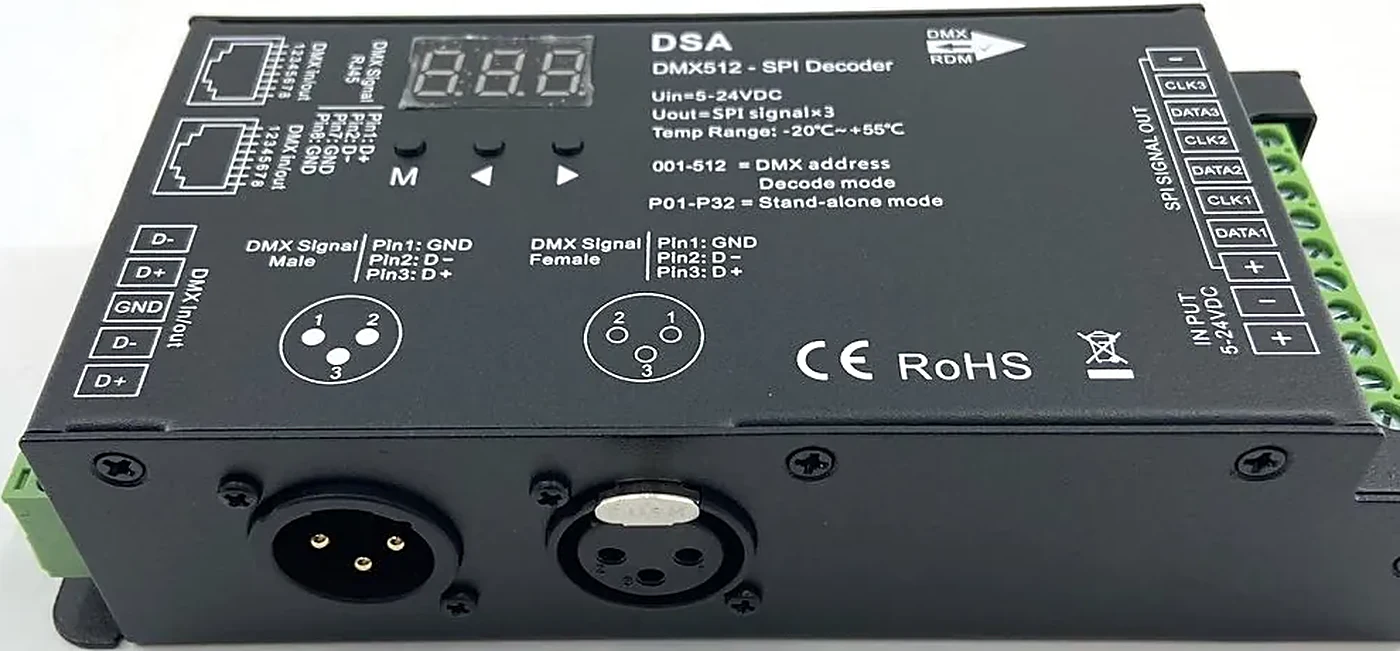
Panels tell you what the firmware can do before you buy: the DSA carries three DATA/CLK pairs, a display that switches between 001–512 DMX addresses and P01–P32 stand-alone patterns, and 3-pin DMX sockets labelled pin 1 ground, pin 2 D−, pin 3 D+. That is the DSA DMX-to-SPI pixel decoder in our own range, photographed rather than illustrated.
If the strip's IC is unknown, test one pixel against a known-good decoder and read the colour order off the result. WS2811 and WS2812B behave identically at the data level but differ in packaging and voltage tolerance, which is what our WS2811 vs WS2812B breakdown compares.
Question 5: which class of decoder are you buying?
The class usually picks itself once the four electrical questions are answered; comparing these four on pixel count is a category error.
Class | Accepts | Outputs | Choose it when | Watch for |
|---|---|---|---|---|
PWM constant-voltage decoder (e.g. PX24506) | DMX512 | 3 PWM channels, 3 A each, common anode | the strip is analog RGB with no IC | cannot address pixels at all |
Single-output DMX→SPI decoder (e.g. DSA, H807DMX) | DMX512 on 3-pin or 5-pin XLR | SPI data, plus CLK pairs on multi-output units | one run of pixels from one DMX line, or a local branch | pixel ceiling per universe; terminal current rating |
Offline SD controller (e.g. K-8000C), often sold as an SPI LED controller | SD card programmed in LedEdit, or an Art-Net master | DMX or SPI, up to 1,024 pixels | the show must run with no console on site | content is fixed until the card is reprogrammed |
Networked Art-Net controller (e.g. PI-1616A) | Art-Net over Ethernet | 16 SPI ports | pixel-mapped content, many universes, live operators | needs a network and a running media server |
Two of these get bought by mistake. The offline controller is chosen by people who do have a console, then found to be a playback device. The networked controller is chosen for a site with nobody on the desk, then found dark at power-up because no server is sending Art-Net. Decide who is in the room at 19:00 on a Tuesday before deciding on port count.
Power, ground and enclosure: the three that fail in August
Data faults show up immediately; power faults appear in the third week of summer, which is why they need their own check.
The decoder's input must match the strip's supply: 5, 12 or 24 V DC. More importantly, on most single-output decoders the strip's current passes through the decoder's terminals. A unit rated at 9 A can pass 45 W at 5 V, 108 W at 12 V or 216 W at 24 V; a 5 V run of 200 W through that block is a heat problem with a warranty attached. Check the terminal rating against the load, not the strip's watts per metre.
Voltage drop is the other half of the supply question: the loss along a run scales with its length and with the current through it, and it is judged against a share of the supply — at 10%, a 5 V strip has half a volt to spend where a 24 V strip has 2.4 V. Measure the far end of each 5 m section under load; a reading well past that 10% is where injection stops being optional. Spacing for those injection points comes back from the same number, not from the strip's nominal watts per metre.
Ground is second. Decoder, supply and strip must share one reference. Two supplies feeding one run — one at each end — is legitimate, but their negatives must be tied, or the data line has no defined zero and the strip reads noise as data. That one detail accounts for much of the "random flicker" in the field.
The third is the enclosure. An IP20 decoder inside a wet facade is a failure with a date on it; the IP code's two digits mean separate things, solids and water, and are worth reading rather than skimming — the IEC's own explanation is the shortest honest source. Decoders are usually IP20 because they belong in a control enclosure — which makes that box, its glands and its heat part of your selection.
When it doesn't work: a triage order
Work down this list; each step assumes the one above is true.
Symptom | Check first | Usual fix |
|---|---|---|
Nothing lights, console shows output | decoder power LED, then DMX activity LED | address outside the console's patch, or D+/D− swapped at the input |
Whole run in one colour regardless of console | whether the box is in stand-alone mode | switch to DMX decode mode; check the display shows an address, not a pattern number |
Colours wrong but consistent (green for red) | byte order setting | set the decoder to the strip's order — GRB for most WS2811 parts |
Random flicker, worse when fixtures move | common ground between decoder and supply | tie the negatives; terminate the DMX line at 120 Ω |
First pixel wrong, rest correct | data level and cable length into the strip | shorten the data lead, or use a level-matched output |
Tail of the run dims or shifts colour | supply voltage at the far end | inject power in parallel; the data line need not change |
Almost nothing there is a faulty decoder: flicker is a wiring and grounding conversation long before it is a hardware one, and the field checklist for pixel strip flicker covers the cases that survive a re-seat.
The decoder checklist to put in your RFQ
Copy these seven lines into the enquiry.
- Strip IC family and byte order (for example WS2812B, GRB), or a photo of the flex printing.
- Pixels per output run, and how many runs.
- Supply voltage and total load per run, in watts or amps.
- Upstream: DMX512 only, or Art-Net/sACN as well — and whether a console is present at run time.
- Required frame rate, and whether the installation is on camera.
- Location and IP requirement for the decoder itself, plus enclosure type.
- Whether stand-alone playback is needed, and whether content will be reprogrammed on site.
A supplier who answers those seven in writing has told you what the box does, what it cannot do, and which model fits — a more useful document than any datasheet's headline pixel count. To see how those classes map onto real hardware, our LED controller and decoder range runs from single-output DMX-SPI boxes to 16-port Art-Net controllers, specified per model rather than summarised.
Specifying pixel LED for a real project?
Send the spec — pitch, IC, IP class, run length, voltage — and you get an engineer's answer, not a catalogue. Samples and OEM/ODM quotes from the Shenzhen factory floor.