
SK6812 vs WS2812B: Which Chip for RGBW?
SK6812 vs WS2812B: the only real difference is the RGBW white channel. Compare protocol, power, voltage drop and PWM, then spec the right chip for your project.
Short version: SK6812 and WS2812B are the same chip family, and the only difference that changes your project is the fourth channel. SK6812 adds a dedicated white LED inside each 5050 pixel — true white without mixing RGB — while WS2812B is three channels (red, green, blue) and renders white by mixing all three, which reads bluish. Same single-wire protocol, same 800 kbps timing, same pinout, so an RGB SK6812 strip is a drop-in replacement for WS2812B. Spec SK6812 (RGBW) when a pixel must produce real white — signage, architectural accents, anything where color temperature matters. Spec WS2812B when the job is pure RGB effects, the budget is tight, or your software stack is pinned to the three-channel ecosystem.
One thing to clear up before the comparison table, because most of what currently ranks for this question gets it backwards: the "SK6812 is immune to voltage drop" claim you will read on supplier blogs is overstated. Both parts are 5 V logic with LEDs in the same 5050 package. SK6812 holds color better at the low end of the rail — we verify that on the bench — but it still dims over a long run. You power both the same way. More on that in the power section.
Two chips, one table
WS2812B | SK6812 | |
|---|---|---|
Channels | 3 (R, G, B) | 4 (R, G, B, W) |
Dedicated white LED | No — white is RGB mixed | Yes — true white |
Supply voltage | 5 V | 5 V (12 V strip variants exist via series wiring) |
Data protocol | Single-wire NZR, ~800 kbps | Same — identical timing |
PWM frequency | ~400 Hz | ~1.2 kHz |
Color depth | 8-bit per channel | 8-bit per channel |
Package | 5050 (plus 3535 and smaller) | 5050, 3535 (mini), 2020, 4020 |
Cut unit | 1 pixel | 1 pixel |
Break-continuity | No | No |
Relative cost | Lower | Slightly higher (extra LED die) |
Both parts are built by WorldSemi, which is why the protocol, the reset timing and the library ecosystem overlap so heavily. The WS2812B datasheet and the [SK6812 datasheet](https://www.superlightingled.com/PDF/SK6812 RGB LED datasheet .pdf) describe the same signalling — reset floors differ slightly (50 µs vs 80 µs), but every standard controller sends ≥80 µs — and what really differs is the silicon inside the package and the fourth die.
The only real difference: the white channel
Here is the whole argument, stated as precisely as we can: WS2812B has no white LED. SK6812 does. Everything downstream — "SK6812 looks better," "SK6812 costs more," "SK6812 needs different software" — is a consequence of that one physical fact.
A WS2812B pixel contains three dies: red, green, blue. To show white, the controller lights all three at equal brightness. The result is a white with a blue cast, because the LED chemistries are tuned for saturated color, not for a neutral white point. It works for effects. It is wrong for white signage text, for warm-white architectural cove lighting, and for any scene where a client will hold a color card next to the strip.
An SK6812 pixel contains four dies: red, green, blue, and a white die — available in warm, natural or cool white temperature options depending on the strip (RGBW variants map to roughly 3000 K, 4000 K and 6000 K in common builds). The controller drives the white die directly, so you get a true white at full brightness without consuming the RGB channels. That is what "RGBW addressable LED strip" means: four independently dimmable channels per pixel, 32-bit color instead of 24-bit.
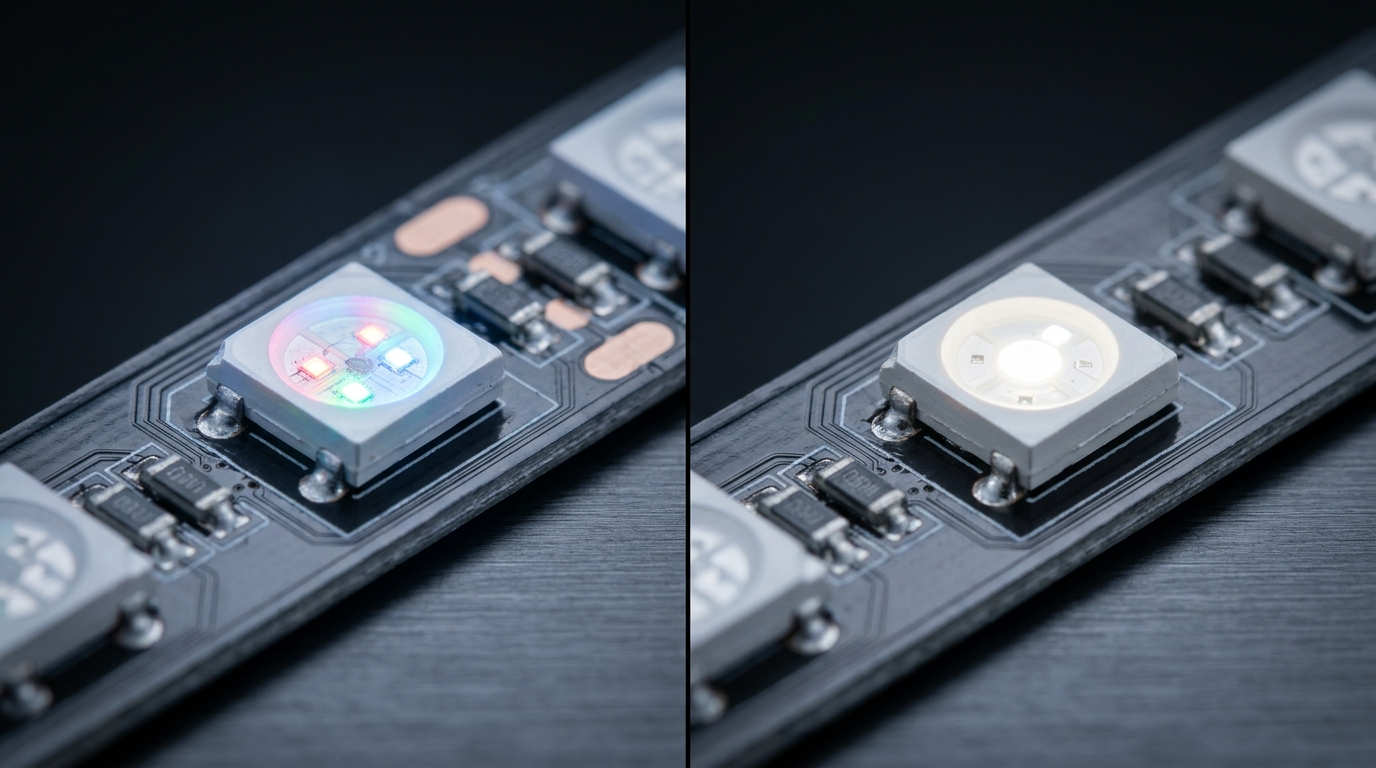
Left: white mixed from red, green and blue on a WS2812B. Right: the dedicated white die on an SK6812 RGBW pixel.
When does this matter enough to pay for it?
- Signage and channel letters — white text and colored accents in the same run.
- Architectural contour and cove lighting — warm white as a base state, color as an effect.
- Any install where white is a feature, not an afterthought.
If every pixel in your project is a color pixel and white never needs to be neutral, the white channel is a feature you are paying for and not using.
Compatibility: can you mix them?
This is where the ranking articles contradict each other, so here is the mechanic-level answer.
RGB SK6812 and WS2812B are interchangeable. Same single-wire NZR protocol, same ~800 kbps data rate, same 24-bit RGB frame, same 5 V logic levels. Reset timing is close enough in practice — both recover on a low line of ≥80 µs, which every standard controller sends (the WS2812B datasheet floors at 50 µs, the SK6812 at 80 µs). You can chain an SK6812 RGB strip after a WS2812B strip on the same data line and it will light correctly. Pololu states this directly: SK6812 "can be used as a drop-in replacement in most applications because it features the same interface and color order."
RGBW SK6812 is not a drop-in for RGB code. The fourth channel changes the data frame from 24 bits to 32 bits. Three-channel controllers and libraries that assume 24-bit frames will treat the white channel as a shift in the RGB data — the pixel lights, but the color is wrong. To drive SK6812 RGBW correctly you need software that knows about the white channel: FastLED supports it through its RGBW path — FastLED.addLeds<SK6812, DATA_PIN, GRB>(leds, NUM_LEDS).setRgbw(...) (FastLED on GitHub) — and the NeoPixel libraries used across the Adafruit NeoPixel ecosystem cover it too. This is a software problem, not a wiring problem: the strip still uses the same three wires (V+, V−, DATA).
Do not chain RGBW SK6812 and RGB WS2812B on one data line unless your controller sends a mixed frame. They use different frame widths; downstream pixels will misread their data. Keep RGBW runs on their own universe or port.
For the wider family comparison — including why WS2811 is the 12 V external-driver option and how WS2815 differs — our WS2811 vs WS2812B breakdown covers the driver-placement differences, and the addressable driver IC guide situates all the WS, SK, TM and UCS parts against each other.
Power reality: 5 V, current draw and voltage drop
Both chips are 5 V parts with the driver inside the LED package. The engineering that matters is the same for both, and none of the ranking articles does it, so here it is.
Per-pixel current. At full brightness with all channels on, a WS2812B pixel draws roughly 60 mA. An SK6812 RGBW pixel draws roughly 60–80 mA — the extra white die is the difference. Two practical consequences:
- Power supply sizing: PSU current ≈ pixels × per-pixel mA × (1 / 0.8 for headroom). A 5 m run of 60 LED/m WS2812B at full white is 300 pixels × 0.06 A = 18 A. The same run in SK6812 RGBW can reach 24 A. That is the difference between one 20 A supply and two 10 A supplies, and it shows up in the BOM.
- Voltage drop is the limiting factor, not data. Copper traces drop voltage along the run; the far end of a 5 m strip at full white will visibly dim and shift color. The rule of thumb for both chips at 60 LED/m: power-inject every 1–2 m, or run multiple injection points from the PSU. Data travels further than power — the signal will be fine long after the far end has browned out.
The "SK6812 has no voltage drop" claim, examined. SK6812's internal design holds color more consistently as the rail sags — this is real, and it is why SK6812 runs look more uniform on marginal power. But "optimized for voltage drop" is not "immune to voltage drop." Both parts share the same 5 V rail physics; if you undersupply the run, both dim. Plan injection the same way, and SK6812 will reward you with better uniformity at the cost of more current.
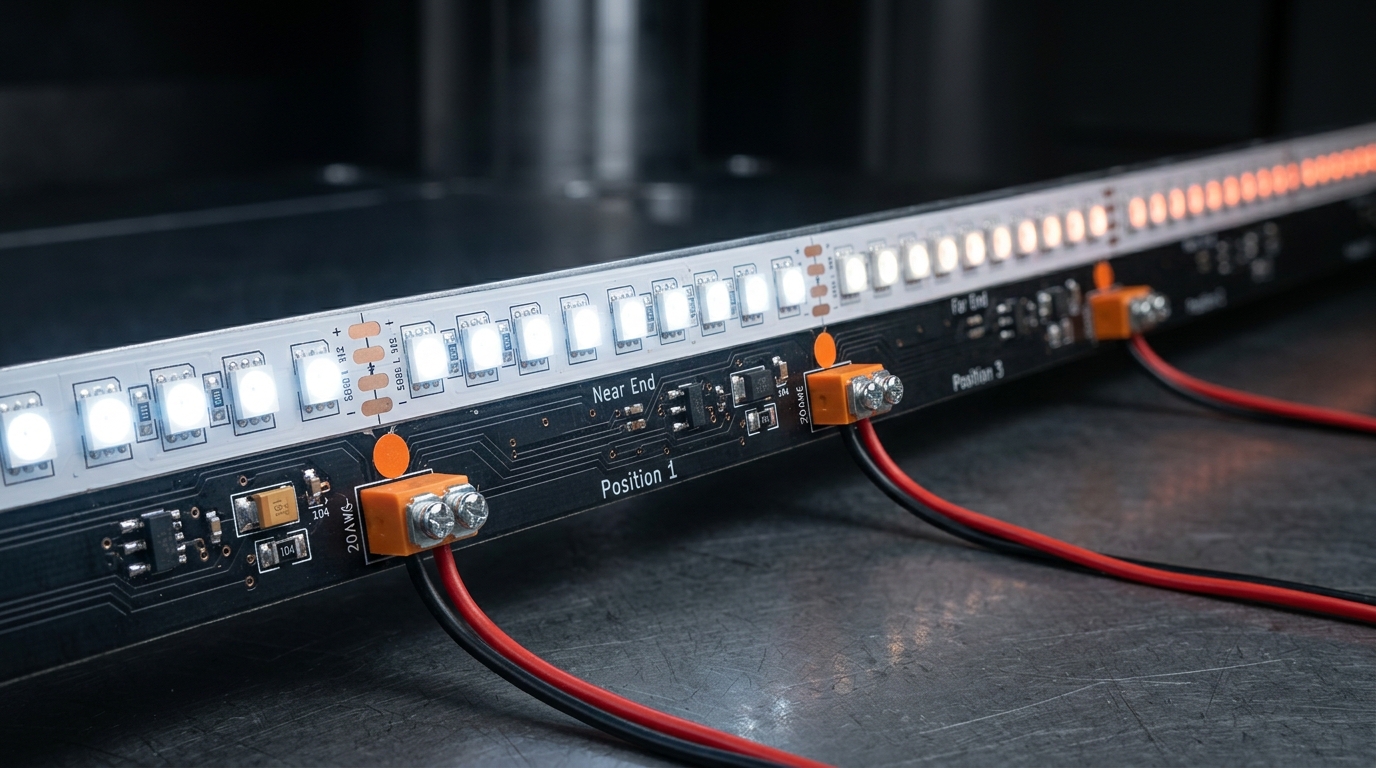
Plan injection points every 1–2 m on 60 LED/m runs; the far end dims and shifts color before the data signal fails.
12 V SK6812 variants exist, and here is the honest mechanics. The chip itself is 5 V. A "12 V SK6812 strip" achieves 12 V by wiring groups of pixels in series with a resistor network — the pixels are still individually addressable, but the cut unit is no longer one pixel, and each pixel sees a regulated lower voltage. If you genuinely need a long 12 V run with per-pixel addressing, compare that against the RGB vs RGBW vs RGBIC buyer's guide before committing — the voltage choice is often better made at the product level than at the chip level.
Camera and stage: why PWM frequency matters
SK6812's higher PWM frequency (about 1.2 kHz versus about 400 Hz on WS2812B) is invisible to the eye — both look flicker-free to a human. It is not invisible to a camera.
At 400 Hz, a rolling-shutter camera can catch the PWM dimming cycle as banding or strobing, especially in slow motion or with short exposure times. At 1.2 kHz the artifacts are far less likely to appear. For stage, broadcast and content walls — where the strip is in the frame — the SK6812's faster PWM is a real spec advantage, not marketing. For architectural installs nobody is filming, it is a non-issue. Our stage and touring pixel LED guide covers the spec sheet items that actually matter in front of a camera.
Ecosystem, cost and sourcing
Software. WS2812B wins the ecosystem argument outright. It is the default addressable part in Arduino, FastLED, WLED and the NeoPixel universe; every controller lists it; every tutorial assumes it. SK6812 RGB is trivially supported (same protocol), SK6812 RGBW needs the 32-bit-aware path. If your team's existing codebase is 24-bit RGB throughout, that is a real migration cost for RGBW.
Cost. WS2812B is the cheaper part — one fewer LED die, massive production volume. SK6812 RGBW carries a small premium for the fourth die. Neither chip's price is the deciding line item on a commercial install; the PSU, the cable and the labor dwarf it. As of August 2026 both parts are commodity items with healthy stock; pricing varies by density, IP rating and supplier, so treat any number you see in a blog post as stale and get a quote.
Form factors. WS2812B is available from 5050 down to tiny packages for dense matrices. SK6812 adds the 3535 "mini" (denser layouts, more heat-sensitive) and the 2020/4020 formats for ultra-narrow strips. Both cut every pixel and neither has break-continuity — a dead pixel on either chip goes dark on its own and data continues downstream, but a failed data path pixel still takes the run with it. That is the WS2815/WS2813 differentiator, not a choice between these two. IP rating (IP20 vs IP65/67/68) is decided by the strip's coating, not the chip — our IP rating guide walks through sealing options for outdoor runs.
When to pick WS2812B
- The design is pure RGB effects — chases, gradients, color washes — and white is never a feature.
- You are porting existing code and staying on the 24-bit ecosystem.
- Budget per meter is the deciding constraint, or the run is long enough that the current difference moves the PSU spec.
- The project is close-range, short runs (under ~2 m) where voltage drop is a non-issue and per-pixel density matters more than white quality.
WS2812B is the right default for most hobby, prototyping and effect-lighting work. It is also the correct answer when your spec sheet literally says "RGB" — buying four-channel hardware for a three-channel requirement is waste.
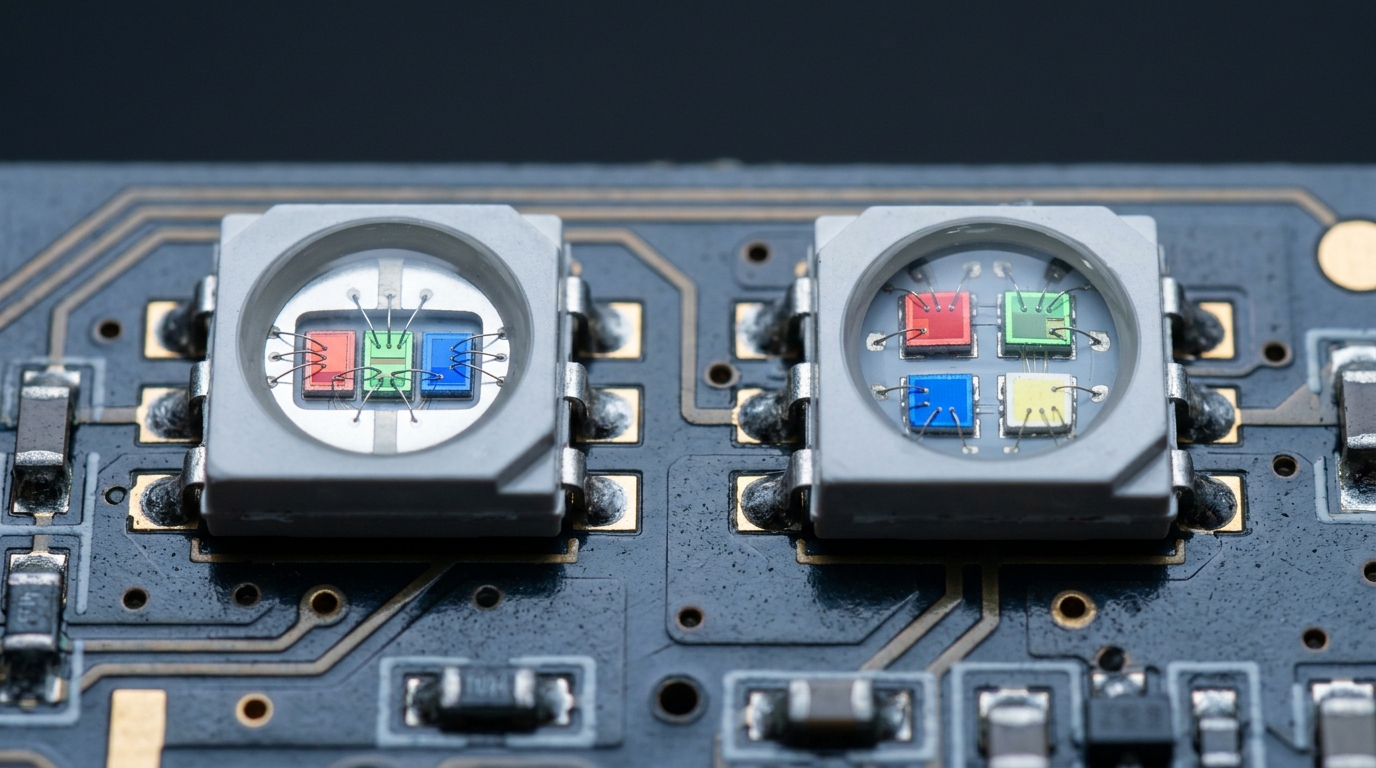
Three dies on the left, four on the right — the entire SK6812 vs WS2812B decision in one close-up.
When to pick SK6812 (RGBW)
- White must be white — signage text, channel letters, architectural cove, retail display.
- You want color temperature control (warm/natural/cool white) alongside full RGB in the same pixel.
- The strip will be in front of cameras and PWM banding is a risk.
- You are specifying a product line and want one SKU that covers both white and color states — an RGBW strip replaces two products.
SK6812 RGBW is the professional's answer for anything with a client walking by it in daylight and a color card in their pocket. On the manufacturing side, this is the configuration we build most often for signage and facade work: SK6812 RGBW addressable strip in 30 or 60 LEDs/m, DC5V/DC12V, IP20–IP68, cuttable every pixel.
Honest limitations of both
Neither chip is the answer to every job, and the articles ranking for this keyword mostly skip this part.
WS2812B's real weaknesses: no white channel (bluish mixed white); 400 Hz PWM can band on camera; 5 V only, so long runs need serious injection; color shifts more visibly under sagging voltage; heat sensitivity at high densities.
SK6812 RGBW's real weaknesses: costs slightly more; needs 32-bit-aware software (an integration cost if your stack is 24-bit); the white die adds current draw, which raises PSU cost on big runs; 12 V "variants" lose the single-pixel cut unit; the 3535 mini format is heat-sensitive in dense layouts.
Shared limitations: both are 5 V logic parts that need proper injection on any run over a couple of meters; neither has break-continuity (a data-path failure kills the downstream run); neither is designed for direct outdoor exposure at bare PCB — sealing is an IP-rated product decision, not a chip decision. If you need 12 V with per-pixel addressing plus breakpoint resume, that is the WS2815 conversation, not this one.
Spec checklist for your project
If you are putting this in a purchase order, these six lines are the ones that matter:
- Channel count — RGB (3) or RGBW (4)? This is the only question that actually picks the chip.
- Voltage — 5 V with injection plan, or a 12 V product-level variant.
- Density — 30, 60, 120 or 144 LEDs/m; density drives both resolution and current.
- IP rating — IP20 indoors; IP65/67/68 for exterior and wet locations.
- Controller and software — confirm 24-bit or 32-bit frame support before ordering RGBW.
- Cut unit and run length — cut every pixel only if the product is wired that way; plan injection points per run.
We manufacture addressable strip on both chips — WS2812B and SK6812 products — and configure the driver IC, voltage, density and IP per order, including OEM and custom builds (how OEM/ODM works). If you send us your run length, viewing distance and control system, we will tell you which chip to spec — including when the honest answer is neither. Start with your parameters here.
FAQ
What are the differences between WS2812B and WS2812? WS2812B is WorldSemi's improved iteration of the original WS2812: it separates the driver logic onto its own die inside the same 5050 package, tightens timing margins, and is the version everyone actually stocks today. For a new design the practical differences are marginal — both use the same single-wire protocol — so spec the part your supplier can actually deliver.
Is SK6812 better than WS2812B? Not universally. SK6812 is better when you need true white (RGBW) or camera-safe PWM; WS2812B is better for pure RGB effects on a budget with maximum ecosystem support. Same protocol, different fourth channel.
Can I use SK6812 and WS2812B on the same strip / data line? RGB SK6812 chains with WS2812B fine — same 24-bit frame. RGBW SK6812 does not mix with RGB-only parts on one data line unless the controller sends 32-bit frames.
What does SK6812 mean? SK6812 is WorldSemi's RGBW-capable sibling of the WS2812B: the same addressable single-wire 5050 format with an added white LED die. "SK6812" alone usually refers to the RGB variant; "SK6812 RGBW" names the four-channel part.
What are the disadvantages of WS2812B LEDs? No white channel (mixed white is bluish), 5 V-only with noticeable voltage drop over runs, ~400 Hz PWM that can band on camera, and no break-continuity.
Is SK6812 compatible with NeoPixel? Yes — RGB SK6812 uses the same protocol and works with NeoPixel-style libraries; RGBW SK6812 needs the 32-bit (RGBW) library path, which Adafruit's ecosystem supports.
Is SK6812 5V or 12V? The chip is 5 V. 12 V SK6812 strips exist by wiring pixels in series with regulation, which changes the cut unit; check the product spec before assuming per-pixel cutting.
Which is cheaper, WS2812B or SK6812? WS2812B is cheaper per pixel (three dies vs four, higher volume). On a commercial install the difference is usually smaller than the PSU and cabling cost; get a current quote rather than trusting a blog number.
Specifying pixel LED for a real project?
Send the spec — pitch, IC, IP class, run length, voltage — and you get an engineer's answer, not a catalogue. Samples and OEM/ODM quotes from the Shenzhen factory floor.