
Club Lighting: Bars, Tubes & Pixel Points
Club lighting is an environment, not a rig: bars, tubes and point lights each own a zone. Map the room by what guests see, then size control, power and heat.
Most club lighting design fails for a reason that has nothing to do with brightness. In a theatre the audience faces one direction and the set does the work; in a club the audience stands inside the light, moves around it, and looks at the room from the bar, the booth, the stairs and the smoking terrace. The wall you lit beautifully is nobody's view. That single fact reshapes the whole specification: you are not lighting a stage, you are building an environment out of light-emitting objects, and the objects have to read from every angle at every height.
This guide is about the addressable layer of that environment — the pixel bars, tubes and point lights that turn a room's architecture into a controllable canvas. PILEDS manufactures all three families plus the Art-Net/DMX controllers that drive them, which is why we can write about club LED lighting as a system rather than as a product list. If you need the fixture-level specs that apply to any pixel product — driver ICs, protocol behaviour, colour handling — our stage and touring pixel LED guide is the fuller reference. What follows is specific to clubs: which geometry belongs in which zone, what resolution each zone actually needs, and what the room will do to the hardware over a 3,000-hour year.
Why club lighting is a different problem from stage lighting
The best description of the job is still a trade-press piece from 2008, when Morgan Landrum, lighting crew chief at the BET Soundstage Club and 8trax, wrote that nightclub lighting is "not a set on stage but an entire environment, all 360º of club space" — and that the audience, unlike a concert crowd, is free-roaming and more interested in each other than in your show (PLSN, "So You Want To Run Lights In A Nightclub?"). Eighteen years later the fixtures have changed and the constraint has not.
Four properties of a club drive every nightclub lighting decision that follows:
The room is viewed from inside. There is no front. A fixture that is brilliant from the dance floor and a dark sliver from the mezzanine has failed half its audience.
The ceiling is low and already full. Ductwork, sprinklers, speakers, air handling. Vertical throw is short, so beam fixtures have less room to work, and anything you mount up there is competing for the only volume the room has.
The room runs long. A club is open five to seven nights, eight to fourteen hours a night with staff cleaning and soundchecking before doors. That is 2,000 to 5,000 operating hours a year, against a touring fixture that might see 400. Thermal design and service access stop being nice-to-haves at that duty cycle.
Nobody can get to it afterwards. Once the ceiling closes, the lighting is behind plasterboard. Every connector, driver and power supply you bury is a future scaffold, and every failure is measured in lost trading nights, not in re-lamp hours.
None of this argues against moving heads, lasers and strobes. They carry the energy of the room and the ambient colour wash the architecture sits in, and the web is full of guides to them. Haze belongs to that layer as well: it decides whether the beams read at all, and it does nothing for the architectural layer this article is about. What is left is the architectural layer, the part that gives the room its identity between drops — a different discipline with its own club lighting fixtures. That is the layer this article covers.
The three pixel geometries, and what each one does to a room
Club lighting fixtures are usually sold as "pixel strip", which hides the only distinction that matters: the shape of the light coming out. Three geometries cover almost every club surface, and they are not interchangeable.
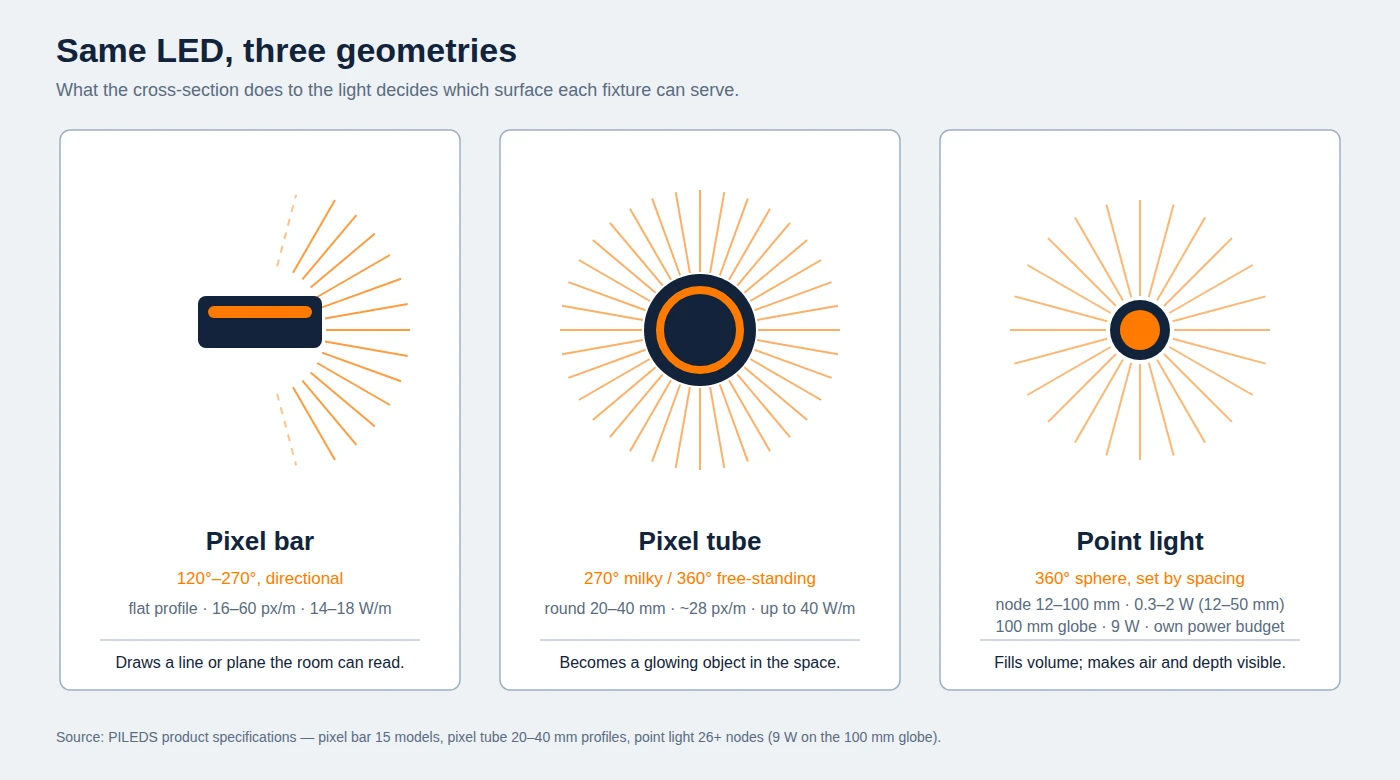
Same LEDs, three optics: a bar throws light in one direction, a tube throws it in a circle, a point throws it in a sphere.
Pixel bar | Pixel tube | Point light | |
|---|---|---|---|
Cross-section | Flat, half-round or square profile, 20–45 mm | Round cylinder, 20–40 mm | Node, 12–100 mm |
Light spread | 120°–270°, directional | 270° (wall) to 360° (free-standing) | 360° sphere, or a narrow lens |
Pixel density | 16–60 px/m | ~28 px/m typical at 360°; 60 px/m on 270° models | Set by your spacing, 5–20 cm |
Typical power | 14–18 W/m at 60 px/m | up to 40 W/m on 168 LED/m models | 0.3–2 W per node at 12–50 mm; 9 W on the 100 mm globe |
Mounts | Truss, coffer, reveal, wall, floor | Base plate, header, cable drop | Suspension, mesh, substrate |
What it does to a room | Draws a line or plane the room can read | Becomes a glowing object that exists in the space | Fills volume; makes air and depth visible |
Characteristic failure | Shadowing where the profile meets the surface | End-cap and base-plate ingress | Data run length and PSU sprawl |
The distinction is optical, not cosmetic. A bar concentrates its output into a defined angle, so a given LED load looks brighter on the target than the same load in a tube. That is the whole difference between an LED pixel bar and an LED pixel tube at equal load. A 360° tube deliberately wastes that concentration: it exists to be looked at rather than to light something else, which is why it dominates column, border and skyline work. A point light is the only one of the three that gives you a gradient rather than a line, and the effect is pure density: 900 nodes at 40 cm spacing light about 144 m², a starfield over a whole ceiling, while the same 900 at 5 cm cover 2.25 m². To cloud a 20 m² ceiling island at that density you need about 8,000 nodes, which is the number that lands in the power and port budget.
Practical consequence: the family you choose is set by the surface, not by the budget. Bars want a plane to sit on. Tubes want to be free-standing or edge-mounted where two or three sides are visible. Points want open volume. Getting this backwards is the most common specification error we see: a client asks for "LED tubes on the ceiling" because tubes are what they saw in another venue, and ends up with a row of glowing rods where a continuous line was needed. The fixture-level comparison of bars and tubes, including how they behave on tour, is in our pixel bars vs pixel tubes breakdown; here the question is only which one a given zone needs.
Map the room: five zones, one geometry each
Walk a club and it separates into five zones almost by itself. The test for each zone is a single question: from where does the guest see this surface? One side, all sides, or from inside the volume.
Zone | What the guest sees | Geometry | Working density | Ingress |
|---|---|---|---|---|
1. Ceiling plane — coffers, rafts, perimeter cove | Up, from underneath, at 3–8 m | Pixel bar, long runs, in profile | 30–60 px/m | IP20 indoor |
2. DJ booth / stage backdrop | Front-on, 3–15 m, on camera | Pixel bar (video-ish) or tube columns | 60 px/m for content; 28 px/m for columns | IP20 |
3. Dance floor edge — steps, risers, floor reveals, bench faces | Down and across, 0.5–3 m | Pixel bar, high density, wide diffuser | 60 px/m | IP65–IP67 |
4. Vertical features — columns, room borders, banquette backs, stairwells | From two or three sides while moving | 360° pixel tube | 28 px/m | IP20, IP65 near doors |
5. Volume — ceiling cloud, tree, chandelier, light curtain | From underneath and through | Point light | Spacing 5–20 cm | IP20 indoors, IP65–IP66 on terraces |
Zone 1 is where most of the money goes and where most of the disappointment comes from. A ceiling plane seen at 3–8 m is the largest single canvas in the room and the one that determines whether the venue reads as designed or as decorated. Bars in a recessed coffer give you a continuous line with no visible hardware; the same fixtures surface-mounted give you a row of glowing sticks. Our MADRIX-driven LED ceiling system is built around exactly that problem: the fixture is easy, the coffer detail and the mapping are not.
Zone 3 is the zone people touch. Dance floor lighting lives at knee height, where steps, risers and bench faces get kicked, spilled on and hosed. Anything at floor level should be IP65 or better and mechanically protected; a beautiful 60 px/m bar under a step is a liability if its end caps are IP20.
Zone 4 is the one a bar-and-strip supplier cannot serve. Columns and borders are seen from two or three sides as guests move, which is exactly the case a directional fixture cannot cover. This is the strongest argument for tubes in a club, and it is why the geometry, not the pixel count, decides.
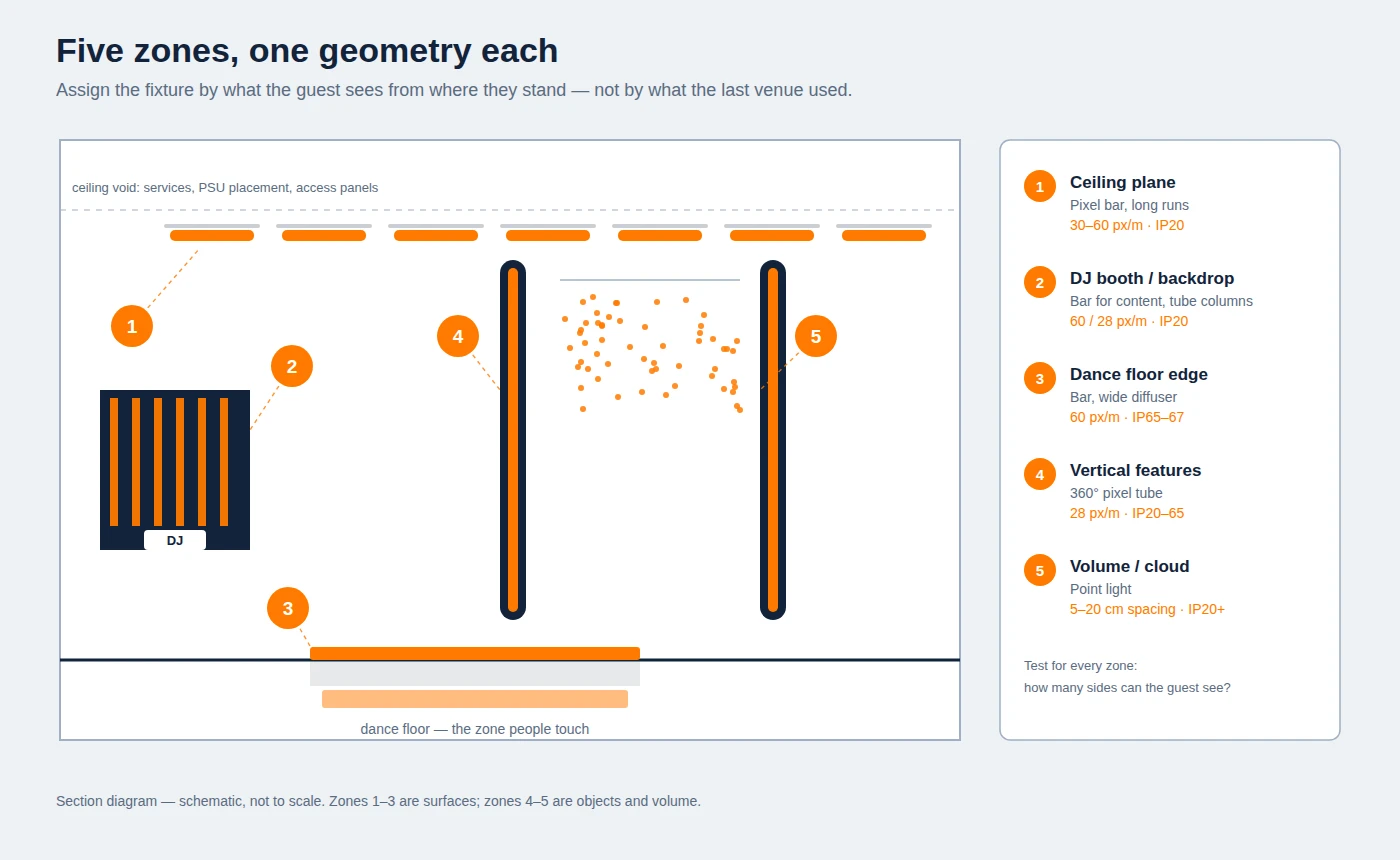
The zone map is the design document: every surface gets a geometry and an ingress rating before a single fixture is chosen.
Two honest exceptions. If the venue is a lounge with 2.5 m ceilings and no dance floor, zones 3 and 5 usually collapse into zone 1 and you should spend the budget on density there instead of spreading it thin. And if the room's identity is a moving-light rig — some clubs genuinely are — then the pixel layer is texture, not architecture, and 3 zones is the right number.
Pixel pitch: matching resolution to distance and content
"More pixels" is the wrong default, and it is the one that quietly doubles a project's cost. What matters is the pitch — the physical distance between controllable points — because pitch sets the finest detail the room can resolve, and it is set by viewing distance and by what you intend to show.
The arithmetic is simple. A fixture rated at 60 pixels per metre has a pitch of 1000 ÷ 60 = 16.7 mm. At 28 px/m it is 35.7 mm. At 16 px/m it is 62.5 mm.
Two different rules then decide whether that pitch is enough, and applying the wrong one is where club budgets leak.
The display rule. On bare or lightly diffused pixels — a clear tube, an open-face bar, anything whose individual emitters you can pick out — dots stop being visible at about one metre of viewing distance per millimetre of pitch, and blend comfortably at two to three times that. By that rule a 16.7 mm pitch is dot-free from roughly 17 m, and a 35.7 mm pitch from roughly 36 m. Treat it as a rule of thumb rather than a standard, since brightness and eyesight move it, but it is the right test for any surface carrying content that has to be read.
The diffuser rule. A milky polycarbonate or PMMA diffuser on a 40–60 mm standoff does the blending that pixel pitch would otherwise have to do. Behind that diffuser a 16.7 mm bar reads as an unbroken line from about 1.5–2 m, and a 35.7 mm bar from about 2.5–3 m, whatever the content. This is not the display rule being broken; it is a different optical system, and it is the one most club surfaces actually use. What no diffuser does is hide structure below its own blending distance: at 0.5 m, close enough to touch, you will pick out individual emitters on any pixel bar regardless of pitch. A dance floor edge is inspected at that range, so specify it for a clean line and coarse content, not for dot-free detail.
Zone | Typical viewing distance | What sets the pitch | Pitch to specify | Reads as |
|---|---|---|---|---|
Dance floor edge | 0.5–3 m | diffuser blending, then coarse content | 60 px/m (16.7 mm) behind a wide diffuser | Continuous line from ~1.5 m; structure visible closer in |
DJ booth backdrop | 3–15 m | content legibility (display rule) | 16.7 mm for content, 35.7 mm for columns | Content legible at 60 px/m; chases fine at 28 |
Ceiling plane | 3–8 m | diffuser blending, then the display rule | 16.7–35.7 mm | Smooth gradients at 60; deliberate bands at 28 |
Columns and borders | 1–10 m | the tube's 360° diffuser | 35.7 mm | Deliberate dot structure, not a defect |
Volume / point clouds | 3–20 m | spacing, not pitch | Set by spacing | Depth and texture |
The second half of the decision is content, and it is where clubs get specified wrong in the opposite direction. A 28 px/m tube running a chase, a wave or a colour band is doing exactly what it should: those effects are coarse by nature and read better with visible structure. A 28 px/m run trying to show a logo will show a smear. Anything that has to be read — a sponsor logo, a wordmark, ticker text — needs 60 px/m minimum, and by the display rule a 60 px/m surface is only dot-free from about 17 m; closer than that it is a low-resolution display, not a video wall.
Point lights invert the logic entirely: their resolution is your spacing. At 5 cm you get a fine field that reads almost like a fabric; at 20 cm you get individual points you can chase. There is no fixture spec to debate: the drawing decides it, which is why point layouts should be settled at design stage and not at commissioning.
One more variable that is invisible in a datasheet and obvious in the room: consistent colour between fixtures. A club runs saturated colour at low brightness, which is exactly where binning differences show. Ask how colour is controlled across production batches, and check a mixed-vendor sample on the actual surface before approving — two suppliers' "RGB red" are rarely the same red, and the ceiling will show it as a seam.
If the room is filmed — and every club is, nightly, by guests — treat CRI/TLCI the way a broadcast specifier would. The white content matters as much as the saturated content: a fixture with a low colour-rendering index turns skin tones grey on a phone camera even when the effect looks right to the eye. A supplier who publishes a CRI figure for their white is telling you it was measured rather than assumed.
Universe math: how much control a club actually needs
Every pixel is a channel count. An RGB pixel consumes three DMX channels, an RGBW pixel four, and one DMX512 universe carries 512 channels — which is 170 RGB pixels, or 128 RGBW. That is the number that decides whether a club runs direct DMX or moves to Art-Net, and it is worth doing the sum before the console is specified.
Fixture | Pixels per metre | Channels per metre (RGB) | Metres per universe |
|---|---|---|---|
16 px/m bar | 16 | 48 | 10.7 m |
28 px/m tube | 28 | 84 | 6.1 m |
60 px/m bar | 60 | 180 | 2.8 m |
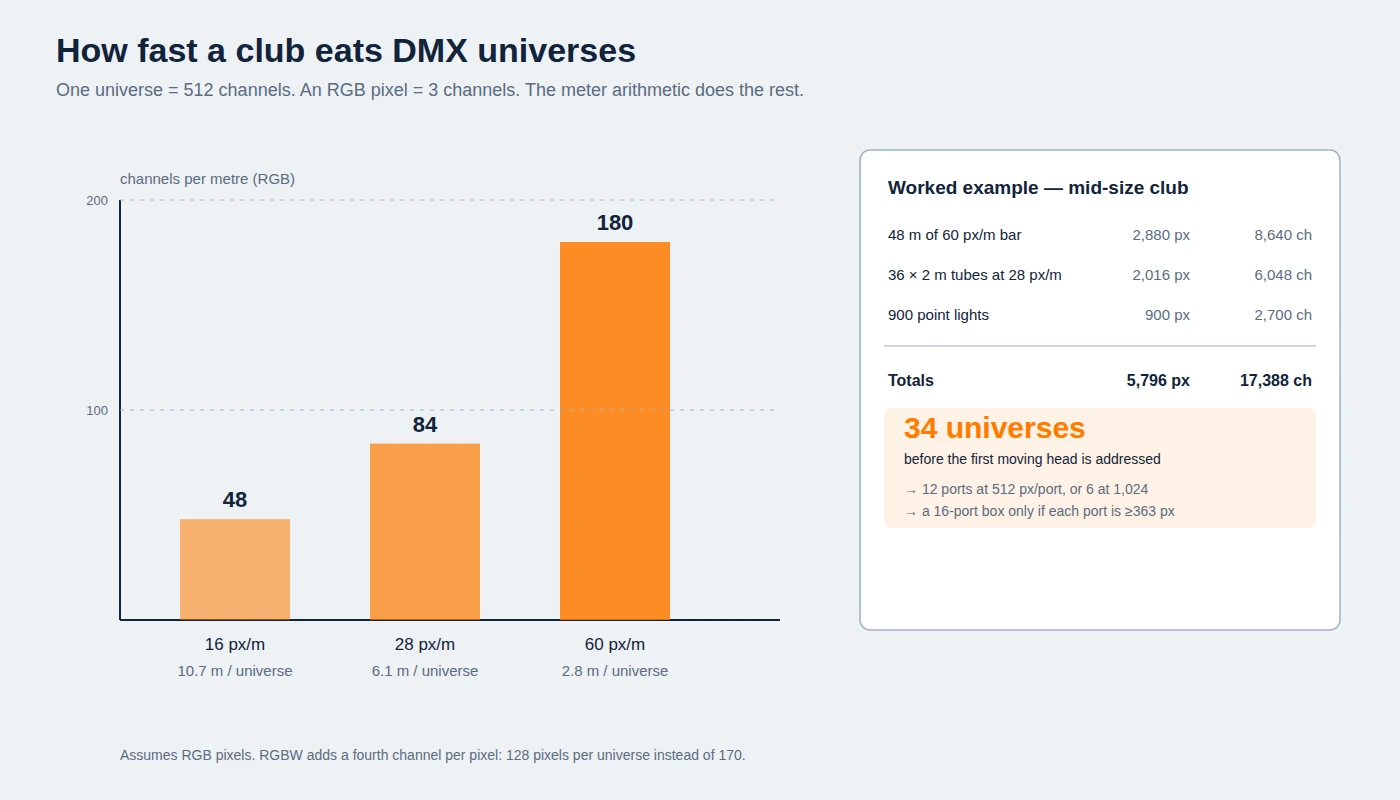
A 60 px/m surface burns a universe every 2.8 metres. This chart is the reason club pixel rigs leave DMX behind.
Run it on a realistic mid-size club — 48 m of 60 px/m bar across ceiling and floor edges, 36 two-metre tubes at 28 px/m, 900 point lights:
- Bars: 48 m × 60 px/m = 2,880 pixels = 8,640 channels
- Tubes: 36 × 2 m × 28 px/m = 2,016 pixels = 6,048 channels
- Points: 900 pixels = 2,700 channels
- Total: 5,796 pixels, 17,388 channels, 34 universes — before a single moving head, strobe or laser is addressed.
Thirty-four universes is not a DMX problem; it is an Ethernet problem. Art-Net and sACN (ANSI E1.31) both carry many universes over one network cable, and every media server and pixel-mapping application outputs one or the other (DMX512, Art-Net, sACN / E1.31). The practical choice between them, and when a club can stay on plain DMX, is covered in our DMX512 vs Art-Net comparison; for club sizing the rule is blunt: under four universes, DMX is fine; above it, plan the network.
Then size the ports, and write down the pixel-per-port figure you are assuming while you do it. The rig is 5,796 pixels: 12 ports at 512 pixels per output (5,796 ÷ 512 = 11.3), or 6 ports at 1,024 (5,796 ÷ 1,024 = 5.7). A 16-port controller covers the example rig only if every output is rated at least 363 pixels (5,796 ÷ 16 = 362.3); at a common 340 px/port rating the same rig needs 18 outputs. So the honest statement is that a 16-port box does the job when it is rated around 512 px/port or better, and does not when it is rated at 340: the same "16-port controller" can be a 5,440-pixel box or a 16,384-pixel box, which is why the rating, not the port count, is the number to demand in writing. Group by zone, not by convenience: one port per ceiling run, one per floor edge, one per column bank. When a port fails at 1 a.m., you want the failure to be a known rectangle of the room rather than a diagonal stripe.
The layer above the controller is pixel mapping, and it is where club projects are won or lost. Mapping software assigns the physical layout — which pixel is where in space — so that a chase can travel across a ceiling and down a column as one movement. MADRIX is the mapping package you will meet on most serious club installs, and any controller you buy should be MADRIX-compatible and Art-Net-native, with its own port count and pixel-per-port limit stated in writing. If a supplier cannot tell you their pixel-per-port limit, that is your answer.
Power and heat in a ceiling you will never open again
Pixel load is heavier than it looks, and it is concentrated in the worst possible place: a closed ceiling void with no airflow.
Using the same example rig at typical figures — 15 W/m for the bars, 40 W/m for 168 LED/m tubes, about 1.7 W per point:
- Bars: 48 m × 15 W/m = 720 W
- Tubes: 72 m × 40 W/m = 2,880 W
- Points: 900 × 1.7 W = 1,530 W
- Total pixel load ≈ 5.1 kW, which at 24 V is roughly 214 A.
Three consequences. First, 24 V is the working voltage for club pixel work: it halves the current of a 12 V system for the same wattage, which halves the voltage drop and the cable size on long ceiling runs. The 12 V / 24 V / 48 V trade-off is worth understanding before you commit, and the supply sizing method, headroom and injection points included, is in our power supply sizing guide.
Second, inject power at both ends of long runs and never rely on a single feed. Voltage drop shows up first as a colour shift at the far end of a run (the reds go pink, the whites go warm) and then as flicker when the run is driven hard. On a club ceiling you get one chance to put the injection points in the right place.
Third, put the power supplies where the heat is not. This is the failure mode that kills club installs two summers after handover. An LED driver's electrolytic capacitors follow the usual engineering rule of thumb — life halves for every 10 °C above rated temperature — and a sealed ceiling void above a packed dance floor runs hot and stays hot. Derate the supplies, load them to about 80 % of rated output rather than 100 %, and where the void is genuinely hot, move the PSUs to a ventilated plant space and run 24 V to the fixtures. A supply that costs a little more cable is cheaper than a ceiling that has to be opened.
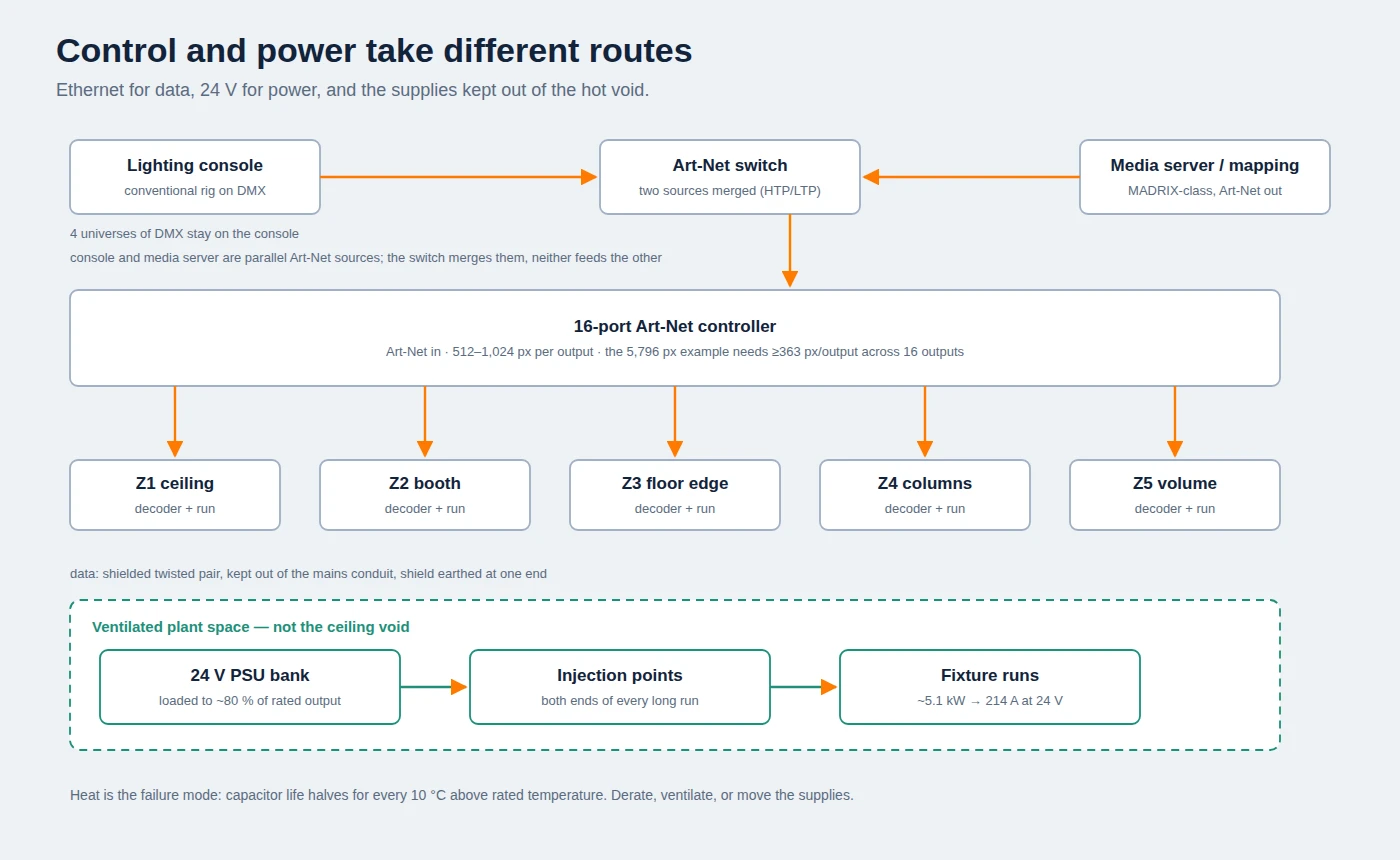
Control and power take different routes: Ethernet to the decoders, 24 V from a cool plant space to injection points along each run.
Surviving the room: ingress, chemistry, interference, service
A club is a hostile environment in a specific, repeatable way. Four mechanisms account for most field failures we see.
Ingress: floor level and at the bar
Indoor ceilings are fine at IP20: nothing up there is being splashed, and the dust load is what normal cleaning already handles. Anything at kicking height, on a bar top, or within splash range of a sink needs IP65 or better. Terraces take IP65 minimum for rain, IP66 where they are pressure-washed, and IP67 only where standing water is possible — rain is the lesser exposure, not the greater one. The IP code is worth reading once: the first digit is solids, the second is water, and IP65 (jets) and IP67 (immersion) are not a ranking of quality but two different tests. The rating also only holds if the end caps, gaskets and cable entries are part of the tested assembly — a waterproof fixture with an untested connector is an indoor fixture. Our IP65 vs IP67 explainer covers what the tests actually involve.
Chemistry: what gets wiped on it
Club cleaning is not gentle: ammonia-based glass cleaner, bleach-based sanitiser, alcohol wipes, and a lot of it, nightly, aimed at whatever is within reach. Polycarbonate diffusers stress-crack under strong alkalis and some solvents; silicone and PMMA behave differently, and extruded aluminium is indifferent. If the fixture is going to be wiped every night, specify the diffuser material rather than letting it default, and put a pH-neutral cleaner in the cleaning schedule.
Interference: the bass-drop flicker
A club is an electrical noise generator — subwoofers, amplifiers, refrigeration, dimmers, all in the same room as your data. Long unshielded data runs alongside mains cable produce exactly the symptom that gets blamed on the controller: random flicker, uncommanded flashes, a run that misbehaves only when the bass drops. Use shielded twisted pair for data, keep it out of the mains conduit, and earth the shield at one end.
Service access
Assume you will lose pixels. The question is whether replacing one costs ten minutes or a scaffold. Design in access panels at each zone, keep a labelled spare strip of every type on site, and make sure the pixel address of every run is written down — a dead pixel at address 1,347 is only findable if someone recorded where 1,347 is.
Commissioning: what to test before the first service
Handover is where a good design either becomes a working system or a maintenance contract. Six checks, in order, done before the venue opens:
- Soak it. Run the full rig, all zones, at show levels for four hours minimum. Thermal faults and marginal PSUs do not appear in the first ten minutes.
- Sweep the dim. Take every zone from 100 % to 1 % slowly and watch for flicker, stepping or dropouts at the low end. Low-level dimming is where weak data and undersized supplies show first.
- Test on camera. Phone camera at 1/1000 s across the room. If the pixel lines band or strobe on screen, the refresh rate or the drive level needs attention now, not on opening night when someone is filming.
- Walk the map. Play a single-pixel test pattern across the whole installation and confirm that what appears on the ceiling is what the map says. This is the only moment when an addressing error is cheap to fix.
- Label everything. Ports, universes, decoders, PSU circuits, and the physical runs they feed. A laminated zone map in the rack room outlives everyone who built the system.
- Hand over to a person, not a manual. The resident operator needs three saved looks they can call without opening the software — doors, peak, last call — and one page telling them who to call. Venues that skip this run the same preset for two years and conclude the lighting was a mistake.
Our rehearsal checklist for pixel fixtures expands these into a per-night routine, which is worth adopting as the venue's own opening procedure.
What to put in the RFQ
A club lighting design is specified in ten lines. Send these to any supplier, in this order, and the quotes you get back will be comparable:
- Zone drawing with each surface marked, and the geometry intended for each.
- Pixel density per zone (px/m), and the coarsest content that zone must show legibly.
- Driver IC and breakpoint behaviour — what happens downstream when one pixel dies.
- Colour — RGB for saturated effects, RGBW where white or camera work matters.
- Voltage (24 V typical) and watts per metre per product, at the density specified.
- IP rating per zone, with the test report and the connector/cap rating stated.
- Protocol and channel plan — universes per zone, and the pixel-per-port limit of the proposed controller.
- Diffuser material and the approved cleaning method.
- Mounting — profile, brackets, base plates, access panels, spare parts list.
- Batch colour control — how consistency is verified across production runs, and whether you can approve a sample on the actual surface.
Two of those lines do most of the work. The pixel-per-port limit tells you whether the control proposal is real. The batch colour answer tells you whether the ceiling will have seams.
Where this gets built
Most of what is in this article comes from projects rather than theory. A US club we supplied runs 750 meteor tubes with 3,500 globe point lights on one control system — the tube-and-point combination this guide describes, at venue scale; the project write-up has the layout. A club in Vietnam uses 650 RGBIC triangle panels as a ceiling field, and a bar in China runs a 1,300 m digital tube backdrop. All three are the same discipline: geometry assigned by zone, one control layer, power and access planned before the ceiling closed.
If you are at the specification stage of a club lighting project, send us the zone drawing and the ten lines above and we will come back with a fixture list, the universe and power budget, and samples for a camera test. Samples are free for qualified projects, and there is no obligation.
Club lighting FAQ
How many pixels can one DMX universe carry? 512 channels. An RGB pixel uses three, so 170 pixels; an RGBW pixel uses four, so 128. A 60 px/m bar therefore consumes a universe every 2.8 m, which is why club pixel rigs run Art-Net rather than direct DMX.
Do I need IP65 fixtures inside a club? At ceiling level, no — IP20 is correct and cheaper. At floor level, on steps, on bar tops and anywhere within splash or spill range, yes: IP65 minimum, IP66 for terraces and wash-down areas, and IP67 only where standing water collects. The rating is only valid for the complete assembly, including caps and connectors.
Can pixel fixtures share a console with moving heads and lasers? Yes, and most clubs do. The conventional fixtures stay on DMX; the pixel layer goes out over Art-Net or sACN to a media server or mapping application, and the console triggers both. The constraint is the network and the mapping, not the console.
Is a pixel bar or a pixel tube better for a club? Neither in the abstract. Bars win where a surface is seen from one side — ceiling planes, floor edges, booth backdrops. Tubes win where the fixture is seen from two or three sides — columns, borders, free-standing features. Choosing by the surface rather than the product name is the whole decision.
Can this run every night, all year? Yes, if it is specified for it. Club duty is 2,000–5,000 hours a year, so thermal design, PSU placement and service access matter more than they do on a touring rig. Derate supplies, keep them out of hot voids, and plan access panels before the ceiling closes.
Specifying pixel LED for a real project?
Send the spec — pitch, IC, IP class, run length, voltage — and you get an engineer's answer, not a catalogue. Samples and OEM/ODM quotes from the Shenzhen factory floor.